Your website and funnels, built where your leads land.
Start from a finished template instead of a blank page. Click any line of text and change it, drag the sections into the order you want, swap a photo by tapping it, then publish. The AI writes the first draft of your copy from a couple of sentences about your business, so you are editing something real from the first minute. It is a website builder for small business and a funnel builder in one place, so the form on every page sends its leads straight into your CRM.

Publish it, take it down, push every page at once
It saves to your account as you go. Publish when you are happy with it, unpublish if you want it back, and push every page in one move once you have edited a few. Photos you upload stay in a media library you can reuse anywhere on the site.
- 01PickChoose the template closest to your business. It opens as a finished multi-page site.
- 02DescribeTell the AI what you sell in a sentence or two and it drafts the copy.
- 03EditClick any line to change it, drag sections into order and tap a photo to swap it.
- 04StylePick the colours and lettering and watch the page change as you choose.
- 05PublishOne move puts it live. Every form fill becomes a lead your agents can work.
One sentence about your business. A page that sounds like you.
Template copy is written for everybody, which means it is written for nobody. Here is the same home page before and after the AI writes its first draft. Tap to compare.
- We are a family roofing company in Denver. Repairs, full replacements and free storm inspections.
- The AI writerDenver roofs, repaired right the first time.
- The AI writerA family roofing company that fixes leaks, replaces worn roofs and checks for storm damage at no charge.
- The AI writerBook a free storm inspection
- Only the words changed. Your layout, photos and colours stayed where you put them.
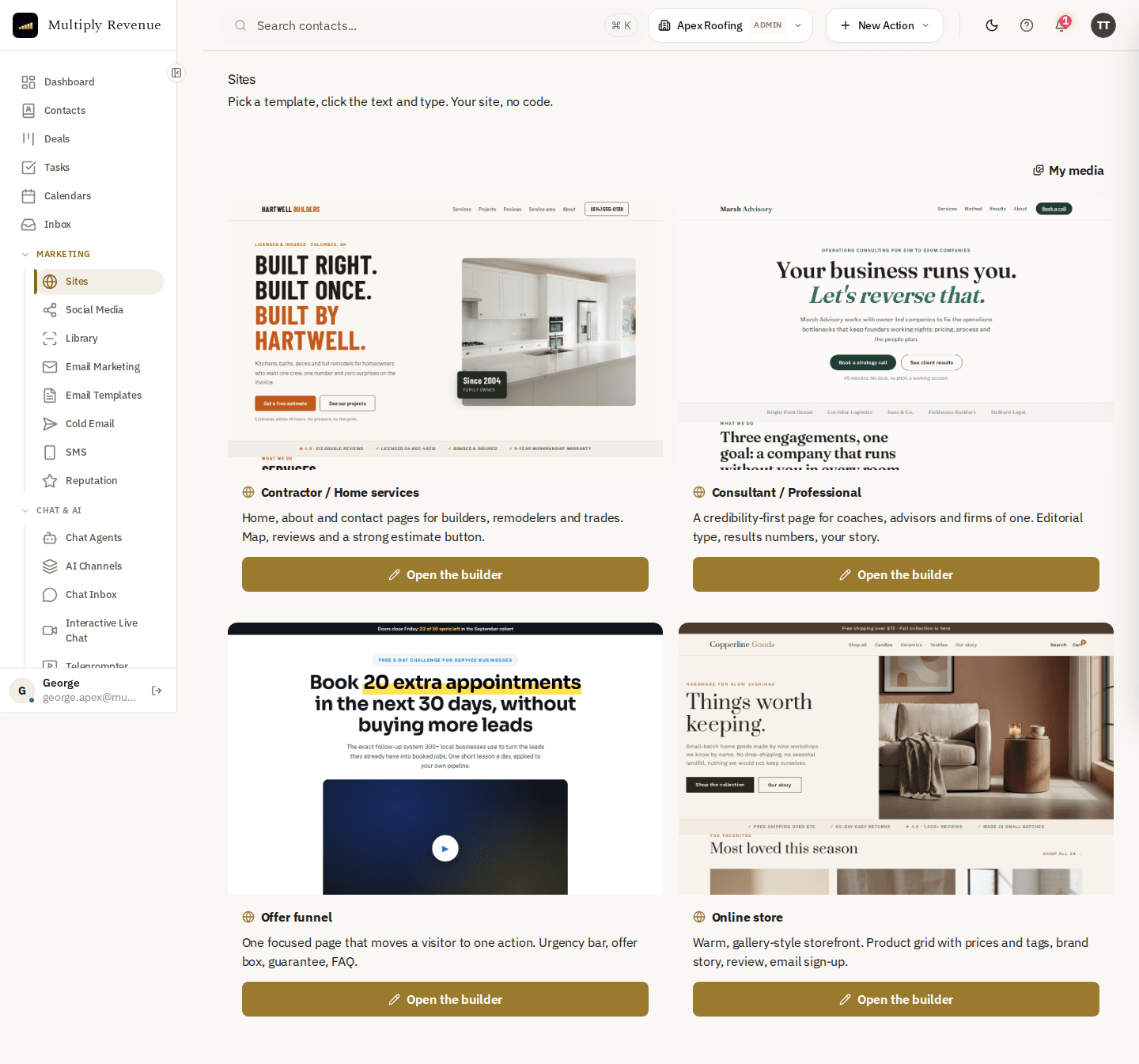
Contractor and home services, consultant and professional, an offer funnel, or an online store. Each arrives as a finished site with a home, an about and a contact page already written, so the job is editing rather than building.
Click a headline and type. Drag a section higher. Tap a photo to swap it for one from your media library. There is no separate editor to learn and nothing to export and re-upload.
Pick a block and drop it onto any page. Paste a video link and the video plays on the published page, so a walkthrough or a job you are proud of sits on the page itself rather than on someone else's site.
Describe your business in a sentence or two and it rewrites the page copy around what you actually sell. It changes the words only and never the layout, so nothing you have already arranged moves underneath you.
Eight colour schemes and six lettering styles, plus the one your template came with. The page updates as you pick, and the choice belongs to the site rather than to whichever browser you happened to choose it in, so your team sees what you saw.
A site that works for you, not one more thing to manage.
Why start from a finished site
A blank page asks you to be a designer before you can be a business owner. Most people stall at the layout and never get to the words.
Every template here opens as a real site with a home page, an about page and a contact page already in place. The sections are arranged and the photos are set. Your job is to make it yours. That is a much shorter job than building one.
What the AI writes and what it leaves alone
You describe your business in a sentence or two. The AI rewrites the page copy around what you actually sell, where you work and what you want people to do next.
It changes the words only. The layout, the order of your sections and your photos stay exactly where you put them. You can redraft as many times as you like without losing the design. Then you click any line and make it sound even more like you.
Why the site belongs next to your agents
A website on its own ends at the form. Somebody leaves their number and it sits in an inbox until someone gets round to it.
Here the form lands in the same account as your AI agents. A visitor who asks for a quote becomes a contact your agent can call, text and follow up with the same day. The site stops being a brochure and starts feeding your calendar.
A website builder for small business that does not start blank
Most small business owners do not want to design a website. They want a page that says what they do, looks like a real company and brings in enquiries. A builder that opens on a blank canvas asks for design skill first, and that is where most people stall.
This website builder for small business starts from a finished template with the pages already written. You change the words, swap the photos and pick the colours. The first version can be live the same day, and the work after that is small edits and not a rebuild.
What a funnel builder should do
A funnel is a short path with one job. Someone arrives, sees one clear offer and leaves their details. A good funnel builder keeps that path short and sends what the visitor typed somewhere useful.
The offer funnel template is built for exactly that. It puts a single offer in front of the visitor and asks for one thing. Because the form lives in the same account as your agents, the person who filled it in becomes a contact in your CRM, not a line in an email you may read tomorrow.
Landing page or full site: which to start with
If you sell one thing to one kind of customer, start with the offer funnel. It is a focused landing page with a single call to action, and it is the quickest route to a first enquiry.
If you need to show several services, an about page and a way to get in touch, start with the contractor, consultant or store template. They open as multi-page sites.
Forms that feed your CRM
The reason to build a site inside the same platform as your CRM is what happens after the click. A visitor fills in the form and a contact appears in your account. Your agents can then call, text and follow up, so a lead does not wait for you to notice it.
That is the difference between a site that looks good and a site that adds to the pipeline. The form is the hand-off, and here it is already connected.
How to choose a website builder
Compare builders on what happens after the page goes live. Ask where the form submissions go, how long it takes to change a line of text and whether the copy has to be written from scratch. Ask what else you must buy to follow up on a lead.
A builder with a long list of templates is not much help if every lead then needs to be copied into another tool by hand. For a small business the useful question is how quickly a visitor becomes a conversation.
Publish, unpublish and edit any time
Nothing about the site is final. It saves to your account as you edit, you publish when you are happy and you can take it down again in one move. If you change several pages, you can push them all live together.
That makes it safe to try things. Rewrite a headline, swap a photo or test a different offer, and put the earlier version back if you prefer it.
Common questions
Do I need to know anything about building websites?
No. You pick the template closest to your business and it opens as a finished site with a home, an about and a contact page already in place. From there you click a line of text and type over it. The parts you do not touch stay exactly as they were.
What does the AI actually write?
The words. You describe your business in a sentence or two and it drafts the copy for the page around what you sell. It does not move anything: the layout, the sections and the order you put them in stay where you left them, so you can redraft the text as many times as you like without losing the design.
Can I change the colours and the lettering?
Yes. Eight colour schemes and six lettering styles, plus the one your template arrived with, and the page updates while you are choosing so you are never guessing. The choice is saved to the site itself rather than to your browser, so your team opens it and sees what you saw.
Can I use my own domain name?
Not yet, and we would rather tell you now than let you find out later. Today your site publishes to an address on our platform and works from the moment you publish it. Pointing your own domain at it is not something you can finish on your own right now, so we are not going to sell it as though you can. We will say so plainly the day that changes.
Can I take a page back down after publishing it?
Yes. Publishing and unpublishing are both one move, and once you have edited several pages you can push them all at once rather than one at a time. Nothing is permanent and nothing needs a developer.
What happens to someone who fills in a form on my site?
They arrive in the same account as the rest of the platform, which is the reason to build the site here rather than somewhere else. A visitor who leaves their number is a lead your AI agent can call and follow up on, instead of an email sitting in an inbox until someone notices it.
Can I put a video on the page?
Yes. There are photo, video and paragraph blocks you drop onto any page, and a pasted video link plays on the published page. It is worth knowing what the design controls do and do not reach: colours and lettering are chosen for the whole site at once, so every page stays consistent, but you cannot colour a single headline on its own today.
Can I use my own photos?
Yes. Upload them once and they live in a media library you can reuse across the whole site. To change a picture on a page you tap the one that is there and pick the replacement.
Is this a replacement for a web design agency?
It depends on what you need. If you want a working site for your business that you can change yourself whenever something changes, this is it, and it is included rather than a separate bill. If you need a bespoke design built around a brand, that is a different job and worth having the conversation.
What should a small business look for in a website builder?
Look at what happens after the page goes live. Where do form submissions go, how quickly can you change a line of text and does the copy have to be written from nothing? A builder that starts you from a finished template, helps with the first draft and sends every enquiry into the same account as your follow up saves the most time.
What is a funnel builder and do I need one?
A funnel builder makes a short page with one offer and one form, so a visitor has a single thing to do. If you sell one service to one kind of customer you probably do. The offer funnel template here is built for that, and each enquiry arrives as a contact in your CRM.
 Multiply Revenue