Skip to content
CRM COMPARISON

The best CRM software for small businesses is the one that calls.

Most CRMs are filing cabinets. They store the lead and wait for you to do something about it. Here is how the popular ones compare on the one thing that decides whether a lead turns into money: whether anything reaches out.

A stack of blank matte graphite tiles with the top one lifted clear on a polished gold sphere
SIDE BY SIDE

Client management software: the questions worth asking.

Comparison of Multiply Revenue against other small business CRMs across six criteria
WHAT YOU NEEDTHIS IS USMultiply RevenueBook a demoGoHighLevelCompareHubSpotComparePodiumCompareKeapCompareBirdeyeCompare
Finds new prospects and calls themYes. Yes, that is the productPartly. Calls your list, does not build oneNo. NoNo. Inbound focusedNo. NoNo. Inbound focused
AI voice calling built in, not an add-onYes. Built inPartly. Voice AI priced separatelyNo. Not an AI callerNo. AI Employee is an add-onNo. Not an AI callerPartly. Not disclosed
One flat AI rate, no fees stacked on topYes. 10 cents/20 cents a minute, nothing stacked on topNo. $0.0140/min plus AI voice feesYes. No call meteringPartly. Message credits applyYes. No call meteringPartly. Not disclosed
Every call scored, so the next one is betterYes. An AI coach scores every callNo. Recordings only, review is your jobNo. NoNo. NoNo. NoNo. No
One shared memory across channelsYes. YesPartly. Depends who built your accountPartly. Across HubSpot tools onlyPartly. Messaging channels onlyPartly. CRM and email onlyPartly. Reviews and messaging
Set up for you, not self-serveYes. Done for youNo. Self-serve, or via an agencyNo. Onboarding fees applyPartly. Not disclosedNo. Paid implementation requiredPartly. Not disclosed

Every competitor fact here was read off that company's own public pricing or product page. Where a vendor would not show us a number, we left the row out rather than guess.

THE FULL BREAKDOWN

One at a time, in detail.

Multiply Revenue vs GoHighLevel

Good at working a list. It just cannot go out and build you one.

Read the full comparison

Multiply Revenue vs HubSpot

A genuinely excellent CRM. The bill grows as your contact list does.

Read the full comparison

Multiply Revenue vs Podium

Strong at handling the people who already messaged you. Nothing in it goes and finds more.

Read the full comparison

Multiply Revenue vs Keap

$299 a month, then a paid implementation before any of it works.

Read the full comparison

Multiply Revenue vs Birdeye

Reviews and reputation done well, priced per location, and pointed inward.

Read the full comparison
THE FULL GUIDE

Choosing the best CRM for a small business.

9 chapters.

What a CRM Does for a Small Business, and When You Need One

A CRM, short for customer relationship management, is the software that keeps every customer and lead in one place: who they are, what they asked for, every call, text and email, and where the deal stands. For a small business the job is simple. Nobody should have to remember which lead was promised a call back on Thursday.

Most small businesses start with spreadsheets, a shared inbox and a phone full of texts. That works until it does not. The usual signs you have outgrown it: leads go cold because nobody followed up, two people call the same customer, you cannot say how many deals are open or what they are worth, and every new hire has to learn where things are kept.

A dark stone card standing upright beside a row of small brass balls

The best CRM for small business teams fixes that without becoming a second job. It should take a few days to set up, not a few months. It should be easy enough that everyone actually uses it, because a CRM with half the data in it is worse than a spreadsheet. And it should earn its cost by helping you close more of the leads you already pay to get.


Key Features of the Best CRM Software for Small Businesses

Every CRM vendor lists hundreds of features. A small business needs a short list done well.

Contact management: every person and company in one record with their history, notes and files. Search should be instant and duplicates should merge, not multiply.

Pipeline management: deals shown by stage so you can see at a glance what is close to closing and what is stuck. Most teams want a simple drag and drop board they can change as their sales process changes.

Lead management: new leads from your website, ads, phone and forms land in the CRM automatically, get assigned to someone and get a first touch fast. Speed matters more than almost anything else here.

A brass phone handset, envelope and speech bubble side by side on a stone slab

Email marketing and texting: send follow ups and simple campaigns from the same place the contact lives, so replies are tracked and nobody has to copy lists between tools.

Automation: reminders, follow up sequences, task creation and stage changes that happen without anyone clicking. This is where a CRM starts saving real time.

Reporting and dashboards: a few numbers you trust, such as leads this week, deals won and revenue by source, without building a report from scratch.

Integrations: the CRM should connect to your calendar, email, phone system and accounting tools so data does not have to be typed twice.

Stone steps rising to the right with a brass ball on each step

Mobile access: owners and field teams check the CRM from a phone between jobs. If it does not work well there, it will not be used.

How to Choose the Right CRM for Your Small Business

The right choice depends on how you sell, not on who has the longest feature list. Work through these questions before you sign up for anything.

Who will use it every day: a solo owner, a small sales team or a whole office? Per seat pricing gets expensive fast as a team grows, so count the people who need access, not just the ones who sell.

What is your budget once everything is added up: the plan, the extra seats, the add-ons for calling, texting and AI, and any required onboarding fee. The sticker price on a pricing page is rarely the real cost.

How do your leads arrive and who reaches out: if most of your business comes from outbound calls and follow ups, a CRM that only stores contacts leaves the hardest part of the work to your team.

Two stone blocks of different heights with a brass ball on the taller one

What do you need it to connect to: your email, calendar, website forms, phone numbers and the tools you already pay for.

How much setup can you handle: some platforms are ready in an afternoon, others are built for companies with an admin. Look for a free trial or a demo on your own data before you commit.

What support do you get: a small business does not have an IT team. Real people who answer the phone are worth more than another feature.

Popular CRM Options for Small Businesses in 2026

These are the names most small businesses look at. Prices were read from each company's own pricing page in October 2026 and change often, so check before you buy.

HubSpot: a free CRM for up to 2 users, and a Starter plan that starts at $7 to $20 per seat a month depending on how you pay. It is easy to start with and grows into a large suite. The jump to Professional is steep: $90 to $100 per seat a month plus a required one time onboarding fee of $1,500.

Zoho CRM: free for up to 3 users, then Standard at $14 per user a month with built in calling, Professional at $23 and Enterprise at $40. Strong value and very customizable, with a busier interface than most.

Pipedrive CRM: a sales pipeline tool known for a clean, visual deal board that sales reps like. Its pricing page did not load for us, so check pipedrive.com for current plans.

Salesforce Starter Suite: the entry plan from the biggest enterprise CRM vendor, aimed at small businesses that expect to grow into the full Salesforce platform. Its pricing page also did not load for us, so check salesforce.com for current figures.

Three dark stone pedestals of rising height, each holding a larger brass ball

monday CRM: a sales CRM built on monday.com's boards, with a 14 day trial rather than a free plan. Basic is $12 a seat a month billed yearly or $18 monthly, Standard $17 or $25.

Freshsales: from Freshworks, with Growth at $9 per user a month billed annually including chat, email and phone, then Pro at $39 and Enterprise at $59. Its AI agent is an add on at $49 per 100 sessions.

GoHighLevel: a bundled marketing platform popular with agencies, at $97, $297 or $497 a month with a 14 day trial. Calling and texting are billed on usage on top.

Keap: a single plan at $299 a month built around email marketing and automation for small service businesses.

Brass balls pouring into a silver funnel and collecting in a bowl below

Multiply Revenue: a CRM with AI sales agents built in that call, text and email your leads for you. Plans are $97, $297 or $497 a month with unlimited users and no setup fee. The full comparison is in the table above.

CRM Pricing for Small Business: What It Really Costs

Most CRM pricing pages show one number. The real monthly cost is that number times your seats, plus the add ons you need to do the actual work.

Seats: most CRM software charges per user. A plan that looks cheap for one person costs ten times as much for a team of ten, and many tools charge for everyone who needs to see the data, not just the people who sell.

Calling and texting: some CRMs include a dialer, others charge for it as an add on or bill minutes and messages through a phone provider. If your team lives on the phone, price this first.

AI: many vendors now sell AI assistants and agents as add ons, credits or sessions on top of the plan.

A thin brass rail resting on two stone blocks with a brass ball at one end

Onboarding: higher tiers of some platforms carry a required one time setup fee in the thousands.

Annual billing: the lowest advertised price is often the yearly rate. Paying month to month costs more.

A fair way to compare is to price the plan you would really use for your real team for twelve months, with calling, texting and AI included. With Multiply Revenue that sum is the plan price, $97, $297 or $497 a month for unlimited users with no setup fee, plus AI agent time at 10 cents a minute inbound and 20 cents a minute outbound, and calls on your own carrier account.

Benefits of a CRM for Small Businesses

A good CRM pays for itself in a few predictable ways.

Fewer lost leads: every inquiry is captured and followed up, so the ones you paid for do not slip through the cracks.

Faster response: when a lead is assigned and contacted in minutes instead of days, more of them turn into conversations and booked appointments.

Better customer relationships: anyone on the team can pick up a conversation with the full history in front of them, so customers never have to repeat themselves.

Brass envelopes travelling along a thin brass rail

A clear view of the business: pipeline, revenue and activity in one place means decisions are based on numbers, not gut feel.

Less admin: automation handles reminders, follow ups and data entry so your people spend more time selling and serving customers.

Room to grow: processes live in the system instead of in one person's head, which makes hiring and training much easier.

Why Most Small Business CRMs Feel Annoying, and How to Avoid It

Ask a small business owner about their CRM and the word that comes up is annoying. There is even a CRM sold under the name Less Annoying CRM. The complaints are almost always the same.

Data entry: the CRM only knows what someone typed in, so it is always out of date. Look for a system that logs calls, texts and emails on its own.

Too many clicks: simple tasks buried under menus built for enterprise teams. Try the five things you do most often during the trial and count the clicks.

A stack of blank matte graphite tiles with the top one lifted clear on a polished gold sphere

Features behind paywalls: the one thing you need sits on the next tier up. Read the plan comparison line by line before you choose.

A filing cabinet that waits: most CRMs store the lead and then wait for a person to act. If nobody does, nothing happens. That is the gap a CRM that reaches out on its own is built to close.

Where Multiply Revenue Fits: A CRM That Does the Outreach

Multiply Revenue is a CRM with a team of AI sales agents built in. Instead of storing a lead and waiting, it calls, texts and emails that lead in a natural voice, follows up until they answer and books the meeting on your calendar. Every call, text, email and booked meeting is written to the customer record automatically, so the data is complete without anyone typing it in.

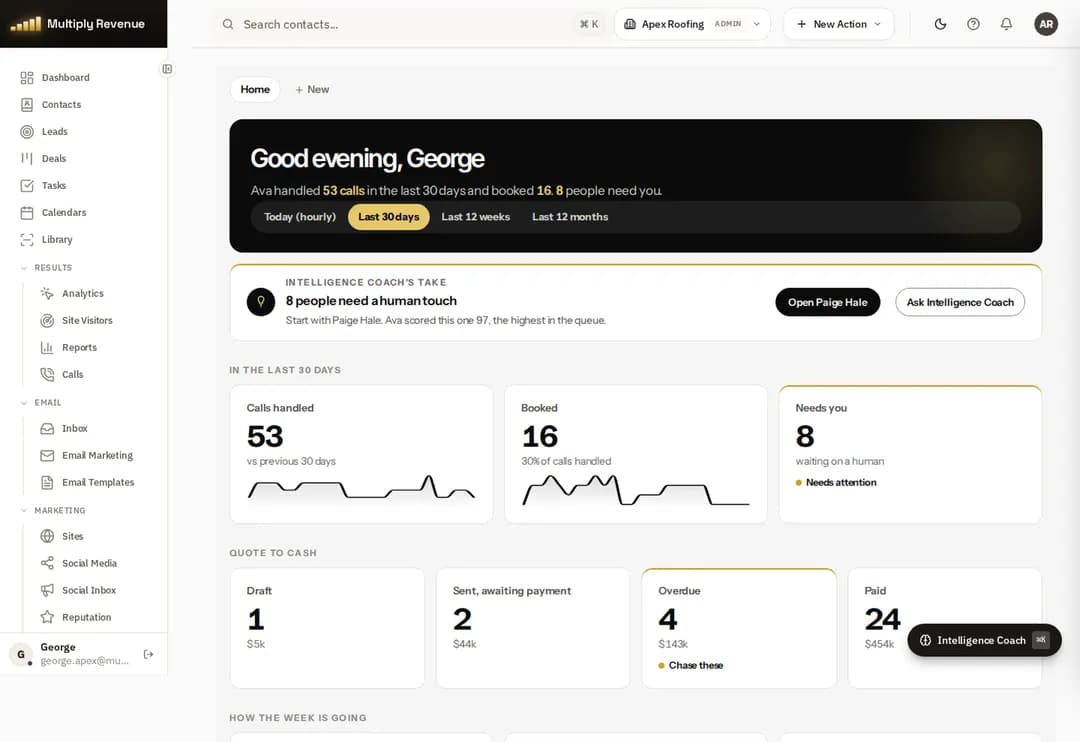
The Multiply Revenue dashboard showing calls handled, booked appointments and people who need a human

It includes the parts a small business expects from CRM software: contacts, pipelines, tasks, calendars, a unified inbox, email marketing and dashboards. Plans are $97, $297 or $497 a month, month to month, with unlimited users and no setup fee, and include 50,000, 250,000 or 1,000,000 contacts. AI agent time is 10 cents a minute inbound and 20 cents a minute outbound, from the first minute, and calls run on your own carrier account.

Already on another CRM? It sends every finished call to your CRM automatically (works with Zapier or Make) and imports or exports contacts by CSV, so you can add the AI agents without moving everything at once.

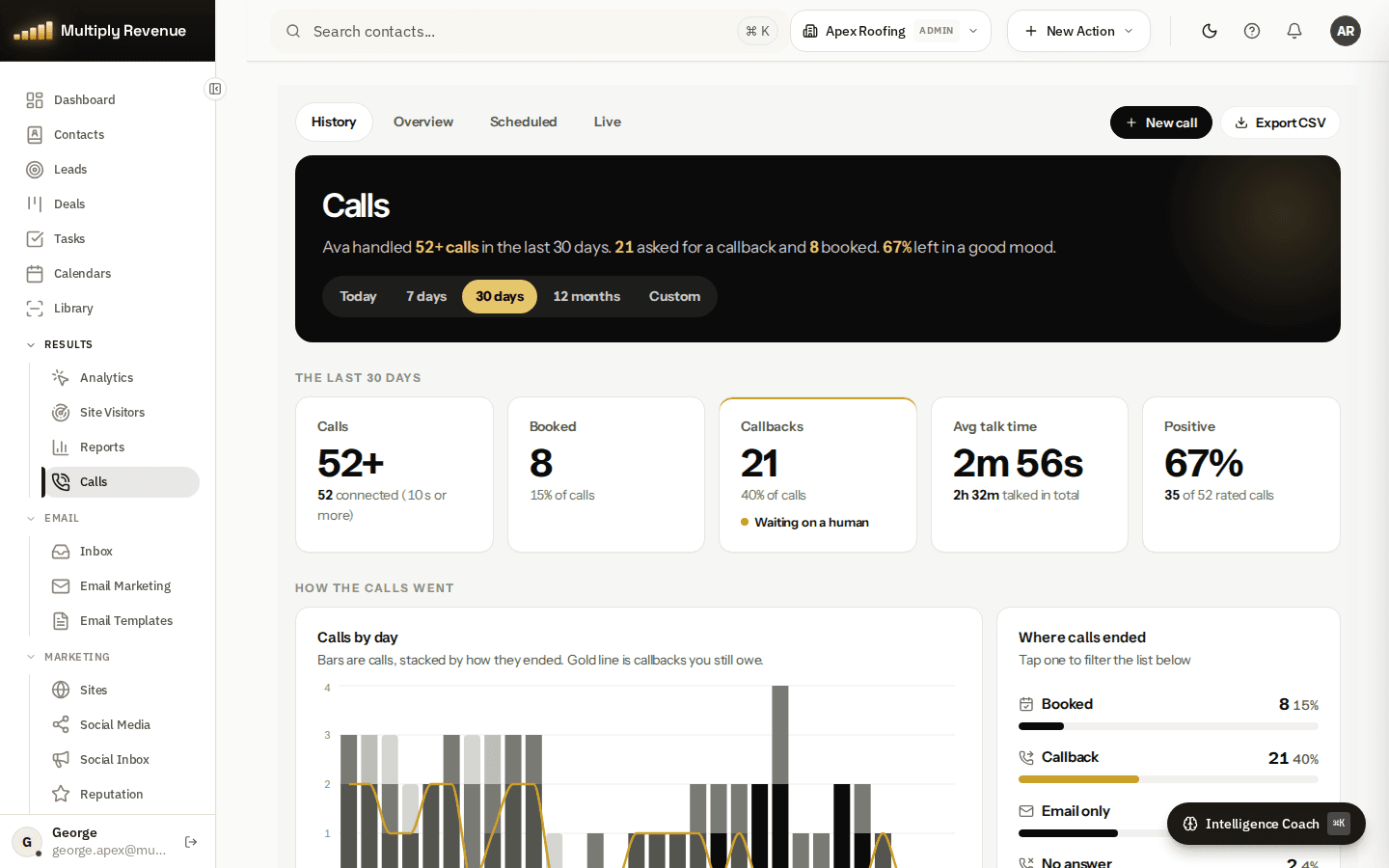
The Multiply Revenue calls screen with calls, bookings, callbacks and talk time for the last 30 days

It is the right fit if your problem is that leads are not getting called back fast enough or often enough. If you only need a free contact list for two people, a free plan from one of the vendors above may be enough to start.

Setting Up a New CRM in Your First 30 Days

A CRM succeeds or fails in its first month. This simple plan works for most small businesses.

Week 1, clean and import: export your contacts from spreadsheets, your inbox and your old tools, remove duplicates and import them. Decide on the few fields you will actually use.

Week 2, build the pipeline: set up the stages that match how you really sell, from new lead to won, and move your open deals into it.

A brass box and a small brass ball on a dark stone tray in warm window light

Week 3, connect and automate: connect email, calendar, website forms and phone numbers. Turn on reminders and one follow up sequence for new leads.

Week 4, measure and adjust: look at your dashboard every Monday. Which leads were not contacted? Which stage do deals get stuck in? Fix one thing a week.

Keep it simple at the start. The best CRM for a small business is the one your whole team uses every day, and a smaller setup that everyone trusts beats a complex one nobody opens.

MORE CRM GUIDES

Find the one that fits how you sell.

QUESTIONS

What people always ask.

QUESTIONS

What is the best CRM for a small business in 2026?

It depends on which problem is actually costing you money. If you have plenty of inbound enquiries and just need them organised, a traditional CRM like HubSpot or Keap will do the job. If the problem is that not enough people are calling you in the first place, a CRM will not fix it, because a CRM stores demand rather than creating it. That is the gap Multiply Revenue is built for: it finds in-market buyers, calls them, qualifies them and books the meeting.

What is the real cost of a CRM once you add everything up?

The subscription is often the smallest part. Watch for four meters: per-seat pricing that grows as you hire, per-minute or per-message billing on calls and texts, AI features sold as add-ons rather than included, and a mandatory implementation package before the software does anything. Keap's own pricing page, for example, lists a $299 a month start, $39 per additional user and a required implementation quoted separately.

Do I need a CRM and an AI sales agent, or just one?

Most small businesses do not need two subscriptions. Multiply Revenue includes the pipeline and contact management alongside the outbound agent, on one flat price, so the conversation the agent has and the record it writes to live in the same place. Where a business already has a CRM it likes, we work alongside it rather than asking anyone to rip it out.

How current are the comparisons on this page?

Every competitor claim here was read from that company's own public pages, and each comparison page carries the date it was checked plus links to the exact sources. Pricing changes often, so treat any figure as accurate as of its stated date and confirm current terms with the vendor before making a decision.

Is there a free CRM for small business?

Yes. As of October 2026 HubSpot has a free CRM for up to 2 users and Zoho CRM is free for up to 3 users, both read from their own pricing pages. Free plans are a good way to start a contact list, but most teams outgrow them once they need automation, calling or more users.

How much does a CRM cost for a small business?

Entry plans from the major vendors run from about $7 to $20 per user a month, and bundled platforms run from about $97 a month per account. The real cost depends on seats, calling, texting, AI add ons and any onboarding fee. Multiply Revenue is $97, $297 or $497 a month for unlimited users with no setup fee, plus AI agent time.

What is the easiest CRM for a small business to use?

The easiest CRM is the one that needs the least typing. Look for one that logs calls, texts and emails automatically, has a simple pipeline board and works well on a phone. Try your five most common tasks during a free trial before you decide.

Want to see it call a real lead?

Twenty minutes with a real person. See it run on your business, then decide.

Book a demo
Multiply Revenue

AI that calls your leads in a natural voice, follows up by text and email until they answer, and books qualified meetings straight onto your calendar. Outbound and inbound, on one memory.

No setup fee, and no per-text charge from us.

© 2026 Multiply Revenue · 1905 Sherman Street, Ste 200, Denver, CO 80203 · (720) 735-8685
Book a demo