The Best Pipedrive AlternativesMultiply Revenue vs Pipedrive, and 11 Other CRMs Compared.
Pipedrive keeps a sales team organized, and every deal in it still moves because a person moved it. Teams look for a Pipedrive alternative for three reasons: per seat pricing as the team grows, features sold as add-ons and a pipeline that still needs filling. Here is how the best CRM options compare on features, pricing and fit.

What the product is built to do
Give a sales team a pipeline to work: deals, stages, activities and reporting on what the reps did.
Does the software call a prospect on its own
Pipedrive's published calling features are about logging calls, scheduling them and integrating video tools. We found no published AI agent that places a call and talks to the prospect.
How you are charged
Per seat. Pipedrive's own documentation puts it plainly: "You're charged per seat, whether it's assigned to a user or not."
Who does the work when nobody is free
Pipedrive automates reminders, sequences and admin around a person. The conversation still needs that person.
Is every conversation scored
Pipedrive offers meeting recording and transcription features. Coaching scores on every call are not part of what it publishes.
Where it fits
Sales teams that already have enough conversations and need them organised and reported on.
AI time is billed by the minute, 8¢ to 10¢ inbound and 16¢ to 18¢ outbound, depending on the plan, and the line for AI calls is part of that rate. Calls your team makes by hand will run on your own carrier account. See our Terms of Service.
Pricing verified October 17, 2026
Every Pipedrive number on this page comes from Pipedrive's own public pricing or help pages, checked on the date above. Pipedrive changes pricing and plan limits over time, so treat every figure here as a snapshot, not a live quote.
See the 14 sources we checked▾
- Pipedrive Support: How does pricing work in Pipedrive
- Pipedrive Support: What features do the Pipedrive plans have
- Pipedrive Pricing
- HubSpot Sales Hub Pricing
- Zoho CRM Pricing
- Salesforce Pricing
- Freshsales Pricing
- Close Pricing
- monday CRM Pricing
- Attio Pricing
- Nutshell Pricing
- Copper Pricing
- Less Annoying CRM Pricing
- Capsule Pricing
Every competitor figure on this page was read from that company's own pricing page or support documentation on October 17, 2026, with annual and monthly billing shown where the page offered both. Pricing and product limits change. Confirm current details directly with each company before making a purchasing decision.
What Multiply Revenue Does for Your Business
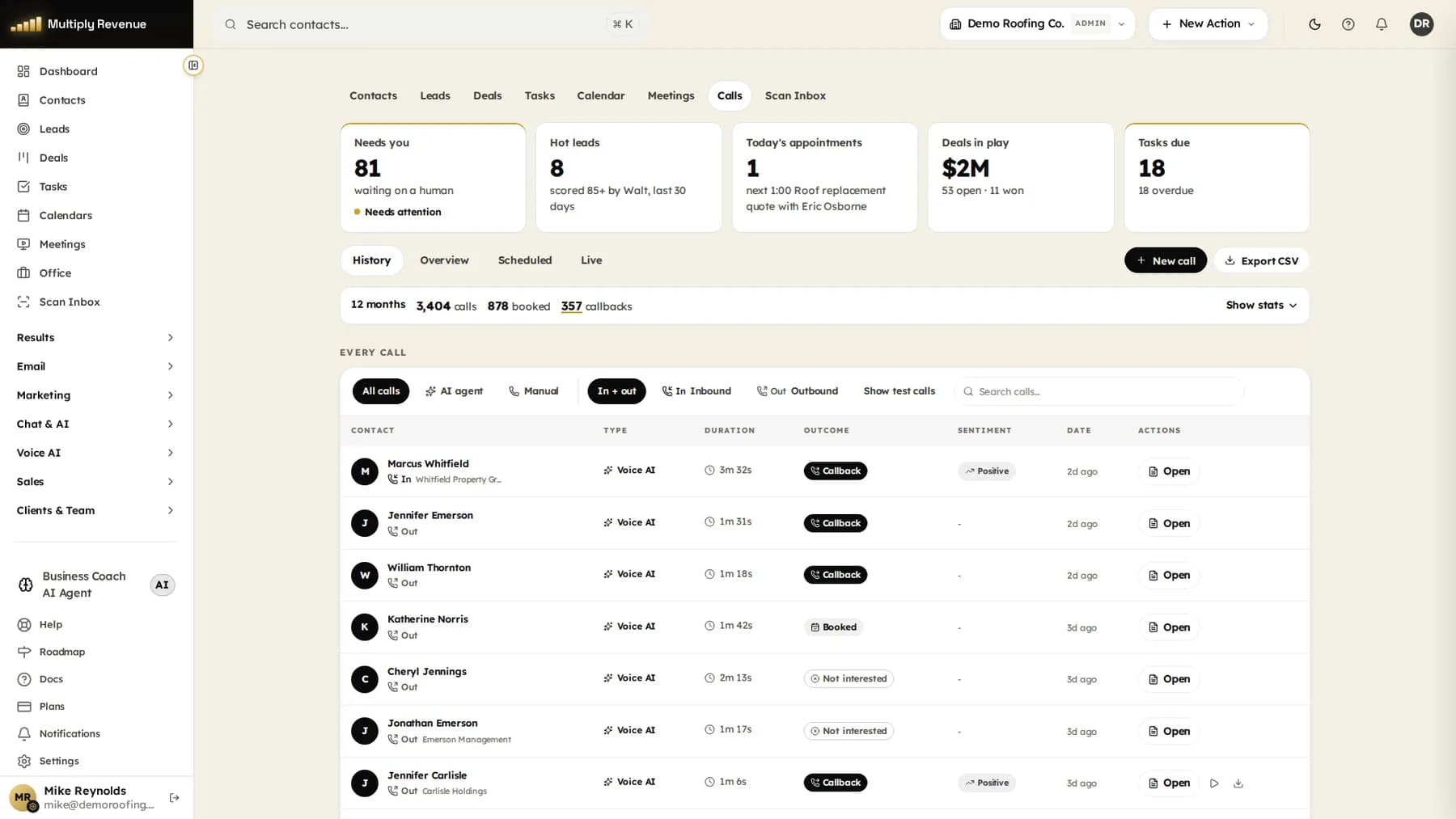
If you are weighing Pipedrive, the difference is who does the calling. Here is what changes when the agent does it.
Your agent works the pipeline
Instead of a list of calls for a rep to make, our AI assistant works the list, qualifies each lead and moves the ones who are ready onto your calendar.
No lead left on a task list
People who do not answer get a call back, a text or an email on the schedule you set, so the follow up happens whether anyone remembers or not.
Every touch logged without typing
Calls, texts and emails land on the contact record by themselves, with unlimited users on every plan, so the deal history is complete without data entry.
Scored calls, not just call counts
Each call is transcribed and scored, so you can see why a deal moved or stalled instead of only how many dials happened.
Why Small Businesses Look for Pipedrive Alternatives
Pipedrive is one of the most popular sales CRMs for small teams, and its visual deal pipeline is genuinely good. The reasons teams start looking at Pipedrive alternatives are usually about cost as the team grows, features sold as add-ons, and a pipeline that still needs people to fill it.
Per seat pricing grows with the team
Pipedrive charges per seat on every plan, from $14 a seat a month on Lite to $79 on Ultimate with annual billing, and more on monthly billing. Its support documentation says you are charged per seat whether or not it is assigned to a user. A ten person team on Growth pays for ten seats before any deal closes.
Sources: Pipedrive Pricing, Pipedrive Support: How does pricing work in Pipedrive · checked October 17, 2026.
Key features are paid add-ons
Pipedrive sells several capabilities separately, including LeadBooster for lead capture, Campaigns for email marketing, Web Visitors, Smart Docs and Projects, each listed with its own starting price. Teams that need email marketing and lead generation can find the real bill well above the plan price.
Source: Pipedrive Pricing · checked October 17, 2026.
No free plan
Pipedrive offers a 14-day free trial with no credit card, but no free plan. Several alternatives, including HubSpot, Zoho CRM, Attio and Capsule, have a free tier for small teams who want to start without spending anything.
Sources: Pipedrive Pricing, HubSpot Sales Hub Pricing, Zoho CRM Pricing, Attio Pricing, Capsule Pricing · checked October 17, 2026.
Marketing automation is light
Pipedrive is built for sales pipelines, not marketing. Businesses that want email marketing, nurture sequences, landing pages and reporting in the same place often move to a bundled platform rather than stacking add-ons.
It organizes deals but does not create them
A pipeline tool records the work your team does. If your pipeline is thin, better organization of a thin pipeline is still thin. That is why outbound tools that actually call and qualify prospects now appear on Pipedrive alternative shortlists.
Admin still falls on the reps
Logging calls, moving deals and writing follow-ups still takes rep time in most CRMs. Teams tired of CRM admin look for tools that capture activity automatically, or that do the outreach themselves and keep the record as a by-product.

How Much Is Pipedrive Per Month in 2026?
Pipedrive's pricing page lists four plans, all priced per seat. With annual billing they are Lite at $14, Growth at $39, Premium at $59 and Ultimate at $79 per seat a month. Billed monthly, the same plans are $24, $49, $79 and $99 per seat. There is a 14-day free trial and no free plan.
Add-ons are priced separately and shown as starting prices: LeadBooster from $32.50, Campaigns from $13.33, Web Visitors from $41, Smart Docs from $32.50 and Projects from $16.66 a month. If you need lead capture and email marketing, add those to the seat price before you compare.
Run your real team through the numbers. Five reps on Growth with annual billing is $195 a month before add-ons; ten reps is $390. Flat priced tools and those with free tiers can be far cheaper for small teams, while tools with built-in calling or AI agents cost more but replace work your reps would otherwise do.
For reference, Multiply Revenue publishes $97, $297 and $497 a month with no setup fee, unlimited users and 50,000 to 1,000,000 contacts by plan and month to month billing. AI calling time is billed by the minute.

Where the Real Difference Shows Up
Pipedrive Records the Work. It Does Not Do It.
Pipedrive is a well-built pipeline tool, and if you have reps making calls it will keep them organised. Every deal still moves because a human moved it. The stage does not advance on its own, the follow-up does not happen on its own, and a pipeline full of untouched deals looks exactly like a healthy one in a report. Multiply Revenue starts from the other end: the calls happen whether or not anybody is free, and the record is a by-product of the conversation rather than a job somebody has to remember.
Source: Pipedrive Support: What features do the Pipedrive plans have · checked October 17, 2026.
Per Seat Is a Bill That Grows Before the Revenue Does.
In Pipedrive's own words, you are charged per seat whether or not that seat is assigned to anybody. That is a normal way to sell CRM software and it has a consequence worth seeing clearly: the cost rises with headcount, which is to say it rises in advance of the results the headcount is supposed to produce. Our plans carry their own allowances instead, so the question becomes what the software does rather than how many people you are paying for it to sit in front of.
Source: Pipedrive Support: How does pricing work in Pipedrive · checked October 17, 2026.
A Pipeline That Fills Itself Is a Different Purchase.
The honest test: if you have plenty of leads and the problem is that they are scattered across inboxes and notebooks, buy a CRM and buy a good one. If the pipeline itself is thin, better organisation of thin is still thin. Making it fuller means something has to reach out, consistently, on the evenings and weekends when nobody is at a desk. That is the job our agent does, keeping the record the whole time.

The Best Pipedrive Alternatives in 2026: Features, Pricing, Pros and Cons
Twelve Pipedrive alternatives, from free CRMs for small teams to sales CRMs with built-in calling and AI. Each entry shows who it suits, its pros and cons and the price its own pricing page showed on the date below, per seat a month billed annually, with the monthly billing price in brackets. We put Multiply Revenue first because it does a different job: it fills the pipeline instead of only organizing it.
We make Multiply Revenue, so weigh our entry accordingly. Every other tool here is described from its own public pages, and none of them paid to be included.
Multiply Revenue
Best for: small businesses that need more deals in the pipeline, not just a tidier pipeline
Multiply Revenue is an AI sales platform with the CRM built in. Its outbound agent calls the people on your own list who agreed to be called, qualifies each prospect and books the meeting, and the deal lands in the pipeline with the conversation attached. Businesses shopping right now come from the in-market add-on, for email and ads. Email and text follow-up, booking and a coach that scores every call sit in the same place.
Pros
- Flat plans from $97 a month, no setup fee, not priced per seat
- Unlimited users, 50,000+ contacts, month to month
- An outbound AI agent that dials, qualifies and books
- Every call scored so the questions that lose people get fixed
Cons: AI calling time is billed by the minute (8¢ to 10¢ inbound and 16¢ to 18¢ outbound, depending on the plan). Teams that only want a pipeline board for reps who already have plenty of leads may not need an outbound agent.
Price: $97, $297 or $497 a month, no setup fee.
See Multiply Revenue pricingHubSpot
Best for: teams that want a free start and a big ecosystem
HubSpot is the Pipedrive alternative most often compared head to head. Its free CRM covers two users, and paid Sales Hub plans add sequences, forecasting and reporting. It is a strong pick when marketing and sales need to share one system.
Pros
- Free plan for two users
- Huge integration marketplace
- Marketing, sales and service hubs that work together
Cons: Professional and Enterprise require one-time onboarding fees of $1,500 and $3,500, and per-seat costs climb quickly.
Price: Free; Starter $7 ($10 monthly); Professional $90 ($100 monthly); Enterprise $150 per seat a month.
Source: HubSpot Sales Hub Pricing · checked October 17, 2026.
Read our full HubSpot comparison
Zoho CRM
Best for: budget-conscious teams that want lots of customization
Zoho CRM is highly customizable, inexpensive per seat and part of a large suite of business apps. It includes a free tier for three users and free onboarding.
Pros
- Free plan for three users
- Low per-seat price
- Free onboarding listed on its pricing page
Cons: Setup and customization take more effort than Pipedrive's simple pipeline.
Price: Free; Standard $14 ($20 monthly); Professional $23 ($35); Enterprise $40 ($50) per user a month.
Source: Zoho CRM Pricing · checked October 17, 2026.
Read our Zoho CRM alternatives guideClose
Best for: inside sales teams that live on the phone
Close is a sales CRM built around calling, email and SMS, with usage passed through at cost. Its pricing page describes an AI agent that calls your leads, has qualifying conversations, books meetings and updates the CRM. It is the closest Pipedrive alternative to an outbound AI approach.
Pros
- Built-in calling and SMS
- AI agent described as calling and qualifying leads
- Fast, rep-friendly interface
Cons: Priced per seat, with higher tiers well above Pipedrive's, and phone usage billed on top.
Price: Solo $9 ($19 monthly); Essentials $35 ($49); Growth $99 ($109); Scale $139 ($149) per seat a month.
Source: Close Pricing · checked October 17, 2026.
Freshsales
Best for: small sales teams that want low entry pricing with AI help
Freshsales from Freshworks offers contact and deal management, built-in email and AI assistance at a low entry price per seat. It is a straightforward move for teams that like Pipedrive's simplicity but want more included.
Pros
- Very low entry price per seat
- AI assistant built in
- Clean pipeline views
Cons: Advanced features sit on the higher tiers, and it is priced per seat.
Price: Growth $9 ($11 monthly); Pro $39 ($47); Enterprise $59 ($71) per user a month.
Source: Freshsales Pricing · checked October 17, 2026.
Salesforce Starter Suite
Best for: growing companies that expect to scale into enterprise CRM
Salesforce brings the best known CRM to small business pricing with its Starter Suite, covering sales, service and email in one place, with a 30-day trial. It is powerful and scales a long way.
Pros
- Scales from small team to enterprise
- Deep reporting and customization
- Free suite and a 30-day trial
Cons: Higher editions get expensive quickly, and getting the most from it takes setup time.
Price: Starter Suite $25 per user a month; Pro Suite $100; higher editions from $195.
Source: Salesforce Pricing · checked October 17, 2026.

monday CRM
Best for: teams already using monday.com for projects
monday CRM uses the same flexible boards as monday.com, so teams can manage deals, contacts and projects in one place. Its pricing page lists an outreach caller agent on Standard and above.
Pros
- Very flexible boards and automations
- Projects and deals together
- Outreach agent listed on higher plans
Cons: Prices depend on seat count, and plans may require a minimum number of seats.
Price: Basic $12 ($18 monthly); Standard $17 ($25); Pro $28 ($41) per seat a month; Ultimate quoted.
Source: monday CRM Pricing · checked October 17, 2026.
Attio
Best for: startups that want a modern, data-driven CRM
Attio is a newer CRM with flexible data models, automatic enrichment and a free plan for three seats. Startups like it for how quickly it can be shaped around their sales process.
Pros
- Free plan for up to three seats
- Flexible, modern data model
- Strong automation
Cons: Less suited to non-technical teams who want something ready to use out of the box.
Price: Free; Plus $35 ($44 monthly); Pro $79 ($99) per seat a month; Enterprise quoted.
Source: Attio Pricing · checked October 17, 2026.

Nutshell
Best for: small B2B teams that want sales and marketing together
Nutshell combines an easy pipeline with email marketing and reporting, sold as a marketing add-on. It is known for responsive support and simple onboarding.
Pros
- Easy to learn
- Sales plus optional marketing
- Many plan sizes to grow through
Cons: Marketing is an extra monthly charge and seats are priced per user.
Price: Foundation $13 ($19 monthly) up to Enterprise $79 ($89) per user a month.
Source: Nutshell Pricing · checked October 17, 2026.
Copper
Best for: teams that live in Google Workspace
Copper is built to work inside Gmail and Google Workspace, logging emails and contacts automatically. It suits relationship-led businesses that want less data entry.
Pros
- Deep Google Workspace integration
- Automatic contact and email capture
- Simple pipelines
Cons: Best value only if your team uses Google Workspace, and higher tiers are pricier than Pipedrive.
Price: Basic $23 ($29 monthly); Professional $59 ($69); Business $99 ($134) per user a month.
Source: Copper Pricing · checked October 17, 2026.

Less Annoying CRM
Best for: very small businesses that want simple, flat pricing
Less Annoying CRM does exactly what the name says: one plan, one price per user and a simple interface for contacts, tasks and pipelines. It is popular with solo owners and small offices.
Pros
- One simple plan
- Easy to learn
- Low flat price per user
Cons: No advanced automation or built-in calling.
Price: One plan, $15 per user a month.
Source: Less Annoying CRM Pricing · checked October 17, 2026.
Capsule CRM
Best for: small businesses that want a simple CRM with a free start
Capsule offers contact and pipeline management with a free plan for two users and states zero setup and onboarding fees. It is an easy step for teams leaving spreadsheets or Pipedrive's lower tiers.
Pros
- Free plan for two users
- Zero setup and onboarding fees stated
- Clean, simple interface
Cons: Lighter automation and reporting than larger CRMs.
Price: Free; Starter $18 ($22 monthly); Growth $36 ($40); Advanced $54 ($60) per user a month.
Source: Capsule Pricing · checked October 17, 2026.
Open Source and Other Pipedrive Alternatives Teams Use
Not every team wants a hosted, per seat sales CRM. These options come up often for teams that want to self-host, avoid per user fees or connect a lighter tool to the rest of their stack. We have not printed prices for them, so check each site for current plans.
SuiteCRM and EspoCRM (open source)
SuiteCRM and EspoCRM are open source CRMs you can self-host on your own server or cloud account. You avoid per user licence fees, but you take on hosting, updates, security and support yourself, which suits teams with technical help in house.
Odoo CRM
Odoo offers an open source community edition alongside paid hosted plans, and its CRM connects to Odoo's apps for invoicing, inventory and projects. It suits businesses that want one system for operations as well as sales tracking.
Twenty
Twenty is a newer open source CRM with a modern interface, built for teams that want to own their customer data and customize workflows. It can be self-hosted or used as a hosted service.
Spreadsheets plus Zapier
Some very small teams leave Pipedrive for a shared spreadsheet connected to their Gmail and forms with Zapier workflows. It is cheap and flexible, but activity tracking, reminders and reporting have to be built by hand, and it rarely scales past a few people.

How to Choose a Pipedrive Alternative
Start with your reason for leaving Pipedrive, then compare the options on the features that matter for that reason. Most teams find two or three of these decide it.
Total cost for your real team
Multiply your seat count by the plan price, add the add-ons you would need, and compare annual against monthly billing. A free plan or flat price can beat a cheaper per-seat figure once your team grows.
Pipeline and deal management
If the visual pipeline is what you love about Pipedrive, test the alternative's boards, stages and deal views with your own data. Reps adopt tools that feel fast and obvious.
Calling, email and SMS built in
Check whether calling, email sequences and texting are included, sold as add-ons or need another tool. Built-in communication means activity is logged automatically, which cuts admin.
Automation and AI that saves rep time
Look for automation that removes work: automatic activity capture, follow-up reminders, AI-written emails and, increasingly, AI agents that call and qualify leads so reps spend their time on qualified conversations.
Reporting and forecasting
Make sure the CRM reports on what you actually manage: conversion by stage, rep activity, revenue forecasts and lead sources. Good reporting tells you where deals stall.
Integrations and migration support
List the tools you rely on, such as email, calendar, accounting and forms, and confirm each connects. Ask what migration help the vendor offers for your Pipedrive deals, contacts and activity history.
Lead generation, not just lead management
Most Pipedrive alternatives manage leads you already have. If you need more leads, look for in-market audience data for email and ads, plus outbound calling on your lists that creates new conversations. That is what Multiply Revenue was built for.

Which Pipedrive Alternative Is Best for Your Reason for Leaving
Pick the row that matches why you are looking. The right tool is usually obvious from there.
Not enough deals coming into the pipeline
Multiply Revenue
You want a free plan and a big ecosystem
HubSpot
Lowest cost with deep customization
Zoho CRM
Your reps live on the phone
Close
Low entry price with AI help
Freshsales
You expect to scale into enterprise
Salesforce Starter Suite
Projects and deals on the same boards
monday CRM
A modern CRM for a startup
Attio
Your team lives in Gmail
Copper
Simplest possible CRM at a flat price
Less Annoying CRM
Do You Need to Switch From Pipedrive? What It Still Does Better
Pipedrive's visual pipeline remains one of the easiest for reps to adopt, and its activity-based selling keeps deals moving when a team is disciplined about it. If your team uses it daily, your data is clean and leads arrive steadily, switching CRMs rarely pays back.
Where Pipedrive falls short is filling the pipeline. If the problem is not enough deals rather than disorganized ones, a new CRM will not fix it. Many businesses keep Pipedrive for their reps and add an outbound tool such as Multiply Revenue to start new conversations that land in the pipeline.

How to Migrate From Pipedrive to Another CRM
Migrating a CRM is less difficult than most teams fear if you plan it. These steps apply whichever Pipedrive alternative you choose.
- 1
Export your data
Export deals, people, organizations, activities and notes to CSV. Keep custom fields and pipeline stages so you can map them in the new tool.
- 2
Map pipelines and fields
Recreate your pipeline stages and custom fields in the new CRM before importing, so deals land in the right place with the right data.
- 3
Import and spot check
Import a small batch first, check that owners, stages, values and dates came across correctly, then import the rest.
- 4
Rebuild key automations and integrations
Reconnect your email, calendar and forms, then rebuild the few automations your team relies on, such as follow-up reminders and lead assignment.
- 5
Train the team and run in parallel
Give reps a short walkthrough, keep Pipedrive read-only for a week or two, then cancel seats once the new CRM is the system of record.
Questions People Ask Before They Switch
Deals That Move Without Being Pushed.
Multiply Revenue's agent makes the calls, qualifies who answers and books the meeting, then writes the record. Hear it run on your own list before you decide.
Other tools, compared honestly.
Best CRM for small business
HubSpot, Zoho CRM, Salesforce and Pipedrive compared on price, seats and setup.
Best CRM with texting
Close, Salesmate, HubSpot and more compared on texting costs and fit.
Best sales tracking software
HubSpot, Zoho CRM, Pipedrive and more compared on price and features.
Clay alternatives
Data enrichment tools compared, and what to use when nobody has time to build.
ListKit alternatives
B2B lead lists compared, and what to use when the list needs to call itself.
Zoho CRM alternatives
An honest comparison if what you need is more conversations to manage.
The rest of the Multiply Revenue platform
Every part below is included on the same login and writes to the same contact record. Nothing here is a separate subscription.