
Skip to content
Back to recruiting

The best recruitment CRM for small agencies playbook.

Everything worth knowing, written out in order. Read it end to end or jump to the part you need. No sign-up, nothing hidden behind a click.

What a Recruitment CRM Has to Do That a General One Does Not

A recruitment business is the only one in this guide with two markets, and confusing them is why so much software sold to this trade disappoints.

On one side are candidates, and that is what an applicant tracking system is for. It holds people, CVs, pipelines against a role, interview stages and placements. Most agencies have one and it is usually fine.

On the other side are clients: the companies with roles to fill. That is a sales function, it is where the revenue actually comes from, and in most agencies it is run out of a recruiter's memory and a spreadsheet. The ATS is not built for it. It knows everything about a role you are working and almost nothing useful about the company that has not given you a role in nine months.

That gap is what a recruitment CRM is for, and the distinction matters because when an agency says it needs a CRM, half the time it gets sold another ATS.

The second thing this business does that others do not is that the same person changes sides. A candidate placed as a senior engineer today is a hiring manager in three years, at a different company, choosing an agency. Nothing in a normal system connects those two records, so the relationship is rebuilt from zero, usually by a competitor.

So what the software has to hold is companies and people over years, not roles over weeks.
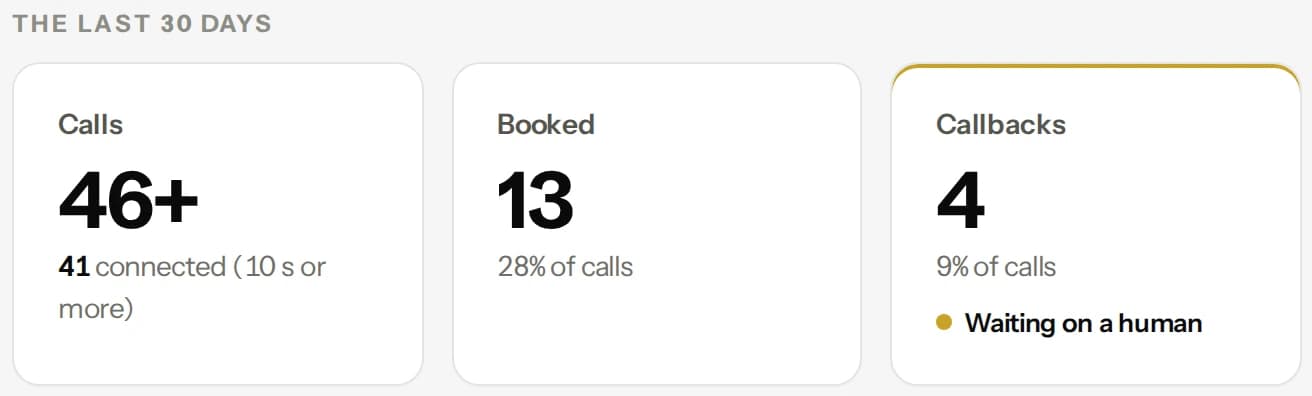
The Calls screen: 46 calls in the last 30 days, 13 booked and 4 callbacks waiting on a person
The last 30 days of calls, shown with a demo account.

The Candidate You Placed Is a Client in Three Years

This is the most under-worked asset in the whole industry and it costs nothing to own.

Every placement you make puts somebody in a job who knows exactly what your agency is like to deal with from the inside. They interviewed through you, they were treated well or badly, and they remember. Then they get promoted, or move, and at some point they are the person deciding who fills a vacancy on their team.

Almost no agency tracks this. The placement closes, the candidate record goes cold, and three years later a business development call goes out to that company from somebody at your firm who has no idea one of your own placements is sitting in the hiring seat.

Working it is not complicated, it is just nobody's job. It means keeping in touch with people you placed, occasionally, as people rather than as leads. How is the role going. Are you hiring. It is a warm call by definition because you got them the job they are sitting in.

The same applies to hiring managers who moved. A client contact who liked you and changed companies is a new account waiting to happen, and their departure is usually the moment an agency quietly loses the old account too, because the relationship was with the person and nobody noticed they left.

An agent can keep both of those lists warm at a volume no recruiter with a desk full of live roles ever will.

The Company That Used You Once

The second list is duller and probably larger: companies that gave you a role, were happy enough, and have not been back.

Agencies tend to read that as a verdict. It usually is not. Hiring is lumpy. A company that filled three roles last year may simply not have hired since, or may have hired through somebody who happened to ring in the week the requirement appeared. That is the whole mechanism in this business: the agency that is in front of a hiring manager at the moment a role opens gets the role, and everybody else hears about it afterwards.

Which means business development in recruitment is not really persuasion. It is timing, repeated often enough to be present when the timing happens. That is a terrible use of an experienced recruiter's day and a very good use of an agent.

The call itself is short and unglamorous: we placed somebody with you last year, is anything coming up, would it help if we kept an eye out. Most of the time the answer is no. The value is entirely in being the one who asked in the week the answer changed.

The list is your own client history. These are companies that have already paid you an invoice, which makes this the warmest business development available to any agency and the one most often skipped in favour of chasing strangers from a bought list.

A brass box and a small brass ball on a dark stone tray in warm window light

What the Agent Actually Asks on a Call to a Hiring Manager

Here is the actual call, because hiring managers are a hard audience and a clumsy one does damage.

It says what it is at the start. The agent identifies itself as a digital assistant calling on behalf of your agency and says the call is recorded. Every call, every state.

On a call to a lapsed client it is short and it leads with the relationship rather than a pitch. We worked with you on a role last year, is anything opening up, who is handling hiring now. That last question matters more than it looks, because the most common reason an account went quiet is that the person you knew left.

When there is a live requirement it does proper intake rather than taking a job title and running. What the role actually is, whether it is a replacement or a new headcount, what the range is, whether it is on site, what the interview process looks like and how fast they need somebody. A recruiter handed that has a real brief. A recruiter handed a job title has a guess.

It does not negotiate fees or terms, and it does not agree to anything commercial. It books the intake call with a person.

On the candidate side it is more careful still. It does not discuss one client's role with another client, it does not share candidate details, and anything that touches somebody's current employment stays with a human. A machine being indiscreet about who is looking for a job is a serious problem, not an awkward one.

It Has to Land in the ATS Your Recruiters Already Live In

A booked intake call that lives in a vendor dashboard is not booked, and in this trade it is worse than that: the recruiter who should be on it works entirely inside the ATS and will never see it.

Every agency already has a system its recruiters live in all day. Any client development layer that does not write into that has created a second version of the truth, and the second version is the one nobody opens.

So the test is mechanical and you should run it on your own stack. When the agent books an intake call, does it appear against the company record in the ATS with the notes attached, and on the recruiter's calendar. When a hiring manager says they are hiring in the autumn, does that become something that will call them in the autumn, or a line in a transcript. When a contact says they have moved companies, does the record update, or does the agency keep calling a number that reaches somebody else.

Backwards matters too. If a role is filled, lost or put on hold, the agent has to know before it calls about it.

And one question specific to this business: can it be pointed at a segment rather than the whole list. An agency growing a particular desk wants the calls going to that sector, not spread evenly across every company it has ever invoiced.

Gold spheres travelling around a brass double ring

What to Check Before You Buy Any Recruitment CRM, Including Ours

Use this on us as hard as on anybody else.

First, establish which product you are being sold. If it manages candidates, pipelines and CVs, it is an ATS and you probably already have one. This is the client side.

Ask whose list it calls. Ours is your own client history, the hiring managers you already know and the candidates you placed. If a vendor offers a bought list of companies, understand that you are buying the same list your competitors are buying.

Ask whether it connects a placed candidate to the company they later work for, or whether every record dies at the placement.

Ask whether it writes into your ATS, and make them prove it on your data rather than a demo account.

Ask whether it can work one sector or one desk rather than the whole database.

Ask what it says at the start of a call and whether recording is disclosed. Ask to hear a real call to a hiring manager, because that audience is unforgiving and a script will not tell you what you need to know.

Ask what it will never discuss. Candidate details and one client's requirement in front of another are the two that matter.

Ask what it does when it does not know. It should fetch a person. And get in writing who answers for it when a call goes wrong with a candidate your client is waiting on.

The Best Recruitment CRM Software for Agencies: Features, Budget and Fit

Most lists of the best recruitment CRM software mix three different kinds of product, and the mix is why they are hard to use. Sort them first and the choice gets easy.

The first kind is the applicant tracking system for agencies. Bullhorn and Crelate are the names most recruiters know. They hold candidates, job orders, clients and placements in one record, and a staffing firm usually cannot run without one. They are built to manage the work you have already won.

The second kind is the talent CRM for in-house teams and larger employers. Gem, Beamery, Eightfold and Avature sit here. They help a company keep a warm pool of candidates and manage employee engagement and internal mobility. They are enterprise tools, priced and set up like it, and they are aimed at an employer hiring for itself rather than an agency selling placements.

The third kind is a sales CRM that wins you the clients in the first place. That is where Multiply Revenue sits. It does not replace your ATS. It finds the companies in your market that are hiring, calls the hiring manager, asks what they are trying to fill and books the intake call, then writes the result back to the system your recruiters already use.

Here is a plain way to choose between them.

If your problem is that candidates and job orders are scattered, you need an ATS. Fix that first. If your problem is that the pipeline of new clients is thin, a better ATS will not help, because it only organises the clients you already have. If your problem is that you want to engage a candidate pool at enterprise scale, look at the talent CRM group.

On budget, be honest about the full cost. An ATS or talent CRM is usually priced per seat and per feature, and the total grows with every recruiter you add. Our prices are published and per plan, so you can read them before you talk to anyone.

Before you commit to any of them, make the vendor show you three things on your own data: a real record moving from lead to placement, the activity and funnel reports your desk heads will actually read, and the email and calendar sync your recruiters will use every day. If a tool cannot do those three well, the feature list does not matter.

How to Run Client Development in Your Recruitment CRM: Pipeline, Reports and Automation

Most agencies run candidates well and client development badly, and the cause is simple: nobody owns the pipeline of companies the way someone owns the pipeline of candidates.

Start by giving client development its own stages. A useful set is: target, contacted, intake call booked, job order received, placement made and dormant. Every company sits in exactly one stage, and a company that stays in 'contacted' for more than a few weeks is a company somebody forgot.

Next, decide which activity counts. An email that was never opened is not activity. A call that reached the hiring manager, an intake call booked and a job order received are. Your weekly report should show those three numbers by desk, because they predict next month's fees far better than the number of messages sent.

Then automate the dull parts. The follow-up after a first call, the reminder to check in with a dormant client and the nudge when a job order has gone quiet should all happen without a recruiter remembering. This is where the agent earns its place. It makes the calls, logs the outcome and creates the next task, so a recruiter's day goes to the conversations only a person can have.

Finally, protect the data. Keep one record per company and one per hiring manager, link the placed candidate to the company they later join, and make sure the intake call lands in your ATS. A funnel report is only as good as the records beneath it. If two people keep two versions of the same client, the report will show the wrong picture and the team will stop trusting it.

The measure of whether it is working is not busyness. It is the number of job orders from companies you did not already work with this quarter.

A chrome funnel catching a stream of small gold spheres into a bowl

Best Recruiting CRM Software: Key Features and Applicant Tracking Compared

A recruitment CRM is not the same as an applicant tracking system, and firms often buy one when they need the other. An applicant tracking system manages candidates for a specific job through stages. A recruiting CRM manages relationships over time, with candidates who are not right today and clients who will hire again.

The key features to look for are a searchable history of every contact, automated follow-up, email and calendar integration and clear analytics on your funnel, from first contact to placement. For a firm that works with clients as well as candidates, the CRM should hold both sides in one record.

Tools in this space differ by size. Enterprise platforms offer depth and large teams pay for it, with a heavier interface and a longer set-up. Lighter tools are easier but offer fewer features. Cons to watch for are per-seat pricing that grows quickly and data that is hard to export. Ask for a free trial and a clear budget before you commit.

Top Recruitment CRM Software for Small Firms: Automation, Engagement and Integration

For a small recruiting firm, the best software is the one the team actually uses. That points to a short list of requirements: automation for the repeat work, engagement tracking so you know who replied, and integration with the email and calendar you already live in.

Our software covers the outreach side. The agent contacts candidates and clients who have dealt with you or asked to hear from you, follows up when they go quiet and books the call, with every step recorded in one place. It says it is a digital assistant, and your recruiters take over when the conversation needs a person.

That is a different job from tracking applicants, and it is meant to sit beside your existing system, not replace it.

A dark stone obelisk with a brass ring circling it

Best CRM for Small Recruitment Agencies: Cost, Analytics and Bullhorn Compared

If you run a recruitment agency with two to ten recruiters, the best recruitment CRM is not the biggest one. Bullhorn is the system the large staffing firms run on, and it is excellent at what it does: an applicant tracking system and a client CRM in one, deep reporting, a marketplace of add ons. It is also priced and built for a business with an operations team to set it up.

A small agency buying Bullhorn often ends up paying for seats and modules it never opens. Vincere, JobAdder and Recruit CRM sit a tier down and are closer to what a small firm needs, with cleaner candidate pipelines and a lower monthly cost per user.

What none of them do is the client side of the work that actually grows a small agency. Every recruiter knows the job: call the companies that used you once and went quiet, call the hiring managers at firms that are growing before the role is posted, follow up the candidate you placed who is now a manager with a budget.

It is the highest value work in the business and it is the first thing that stops when the desk gets busy. That is the gap our software fills. The digital assistant works the lapsed client list and the growing companies list every week, asks whether they are hiring and books the intake call on the recruiter's calendar.

On cost, compare what you pay per month against what one extra placement is worth, not against the cheapest seat price. On analytics, look for one report, the one that shows every client conversation from first call to signed terms, because that is the number a small agency owner needs to see. And keep your ATS. The assistant sends the booked call and the notes back to the system your recruiters already live in, so nothing has to move.

PROFESSIONAL SERVICES

Common questions, what it costs and what it will not do are answered back on the recruiting page.

Hear it run on recruiting.

Twenty minutes with a real person. See it run on your business, then decide.

Book a demo
Multiply Revenue

AI that calls your leads in a natural voice, follows up by text and email until they answer, and books qualified meetings straight onto your calendar. Outbound and inbound, on one memory.

No setup fee, and no per-text charge from us.

© 2026 Multiply Revenue · 1905 Sherman Street, Ste 200, Denver, CO 80203 · (720) 735-8685
Book a demo