Everything worth knowing, in order. No sign-up, nothing hidden behind a click.
THE GUIDE
Read it end to end, or jump around.
19 chapters.
01
The Follow-Up Gap
Most reps give up after one or two attempts, and most deals need considerably more than that. The exact figures are argued over and the widely repeated ones trace back to sources nobody can produce, but every team that has measured its own finds the same shape: they stop well before the deals close.
That gap is not a motivation problem and treating it as one is why so many attempts to fix it fail. When somebody is juggling live clients, new enquiries and admin, follow-up is the thing that gets dropped, because it is the only one with no deadline attached. The work required to follow up properly with every lead, every time, for as long as it takes, is more work than the people you have.
So the fix has to be structural. The follow-up either happens without a person remembering, or it does not happen. Automation is not a productivity upgrade here. It is the only version of the job that can actually be done at the volume you already have.
02
Why Response Time Decides So Much
A lead goes cold in minutes, not hours. Somebody who fills in a form is usually filling in several, and the first real conversation tends to win, not because that company is better but because the question has been answered and the shopping is over.
This is the part most teams underestimate, because the lead does not disappear. It sits in the CRM looking exactly like a live opportunity for weeks. Nothing tells you that it was decided four hours after it arrived.
The automation fires the moment a lead enters the system: an email, a text and an internal notification, and a call queued behind them. It reads what the lead actually did, which page, which form, which campaign, then sends the message that fits rather than the same template to everybody.
What that buys you is not a better pitch. It is being in the conversation while there still is one.
03
How We Set It Up in Your Business
We start with what you already run. Your CRM, your email platform, your phone system, your calendar. We map where data moves between them and where it stops moving, because the gaps between tools are where most leads are actually lost. Nothing gets ripped out. The automation layer sits on top of the stack you have, so your team keeps working in the tools they already know. That also tends to surface a few quick wins that need no new software at all, which we will tell you about rather than quietly bill for.
Then we write down what your process actually is. What happens when a lead arrives, who touches it, how follow-up works today, where deals stall and what your best rep does that the others do not. That last one is the valuable part and it is almost never documented anywhere. Those conversations become the blueprint. A rules engine needs rules. This needs a clear picture of what a good outcome looks like, because that is what it is copying.
Next we build, test and deploy against your real data and real tools. Every trigger, every action and every exception path is tested before it touches a customer, including the ugly ones: what happens when a lead fills in the form twice, when a phone number is wrong, when somebody replies stop. Your team gets a walkthrough and a dashboard showing what is running and what it did.
After that the work is tuning. The system handles the follow-up, the reminders, the data entry and the first-pass qualification, which means your team's calendar fills with conversations that are already warm. What you watch from there is which sequences are producing meetings and which are producing nothing, and you change the second kind. That is an ongoing job, not a launch.
04
What the Automation Layer Covers
From the moment a lead arrives to the moment a deal closes, these are the steps that run without anybody doing them by hand.
Volume. A good rep manages 50 to 80 follow-ups on a strong day, and that is a hard ceiling. The automation engine handles thousands, each one personalized from the contact record and timed to what that person did.
Capture. Every form submission, inbound call and social message is captured, tagged and routed to the right person as it happens, rather than being found later in an inbox.
Email campaign totals, shown with a demo account.
Scoring. Each lead is scored against your ideal customer profile, the qualifying questions get asked automatically and the CRM record carries a priority before a rep opens it.
Sequences. Multi-channel follow-up across email, text and voicemail drop, spaced by what the prospect did rather than on a fixed daily drip.
Appointments. Booking confirmation through to day-of reminders, with the reminder cadence that reduces no-shows because somebody gets a text the morning of rather than nothing after the booking email.
Pipeline hygiene. Stages update from what actually happened. Stale deals raise an alert, won deals start onboarding and nobody spends Friday afternoon reconstructing the week.
Reporting. Daily performance digests and alerts when a number moves, so you find out that answer rates dropped on Tuesday rather than at the end of the month.
05
It Runs on the CRM You Already Have
A CRM is only as good as what gets typed into it, and the honest position is that reps do not type into it. The automation writes the record as the work happens, which is the only version that stays current.
No migration and nothing ripped out. The layer connects on top of what you run today.
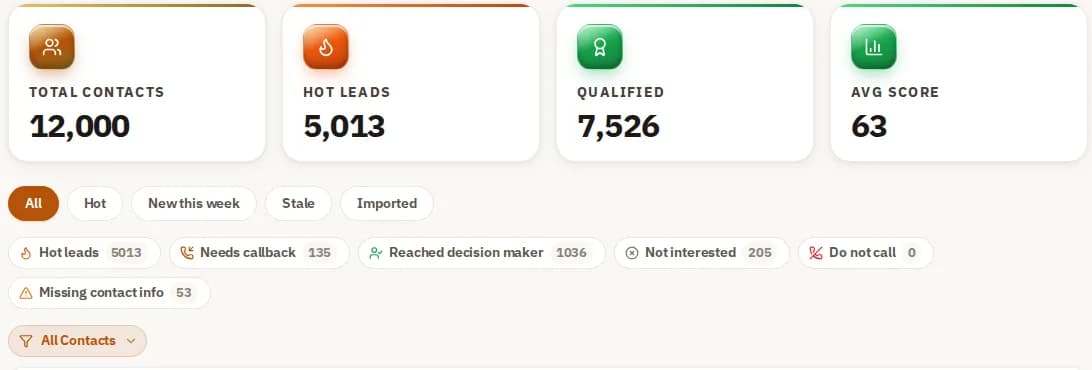
Contacts sorted by what to do next, shown with a demo account.
06
Where Rule-Based Tools Break
Conventional workflow tools follow fixed rules and stop working the moment conditions fall outside them. A reply that says "call me after three on Tuesday" is a dead end to a rules engine and an instruction to this one. Here is a straight comparison against a manual process and against the tools most teams already tried.
07
Seven Sequences Worth Building First
These are the sequences we build for most clients, in the order they usually pay off. Running them together matters more than running any one of them, because they cover different moments in the same customer's life.
New lead, first hour. The moment a form is submitted or a tracking number is dialled, three things fire: an email, a text and a notification to the assigned rep. No response in four hours triggers a second email with a different angle, then a final text check-in at 24 hours. The point is that the lead hears from you while they still remember filling in the form.
No-show recovery. When somebody misses a booked appointment, a text goes out immediately acknowledging it and offering three new times, worded as though it were nothing, because usually it was nothing. No reply in two hours sends an email with a direct booking link. At 24 hours a voicemail drop goes out, low pressure. Most businesses do none of this and write the booking off, which is why it is the sequence with the shortest path to revenue you already earned.
Dormant lead re-engagement. Leads that went quiet 30, 60 or 90 days ago are not dead, they are unfinished. The system segments them by where they stalled and sends a message that fits that stage rather than a generic check-in, so somebody who dropped off at pricing hears about pricing.
Referral requests, timed properly. Most referrals are never asked for, and the ones that are get asked for at the wrong moment. The system watches for the moment a customer is visibly happy, a positive review, a job finished on schedule, a renewal. It sends the ask then, with the referral terms explained and a one-click share.
Review requests. Reviews are won or lost in the day after the work is done. A thank-you text with the Google review link goes out first, then an email two days later if there was no response. A high rating leads into the referral ask. A low one alerts a manager before it becomes a public review.
Post-purchase upsell. After a first purchase, a timed sequence runs based on what they bought. A roofing repair customer gets an inspection offer at six months. An HVAC customer who bought a unit gets the maintenance plan at three. An auto insurance client gets the home bundle at 90 days. Each is a real reason to make contact, which is why they work better than a newsletter.
List hygiene. Contacts who have not engaged in six months drag down your email deliverability, which quietly costs you everything else on this list. A three-step sequence runs: a curiosity email, a direct offer by text and a final message that says outright you will stop contacting them. Whoever responds goes back into nurture. Whoever does not comes out of active campaigns, which protects the inbox placement of every other sequence here.
08
What It Connects To
The layer sits on top of the platforms your team already uses and sends results to your CRM through Zapier or Make. No migration, and connection is measured in days rather than months.
09
How It Runs in Different Industries
The sequences worth running depend on how the business actually earns. Here is how four of the common ones are set up.
HVAC. The business is seasonal, which means revenue is feast or famine unless somebody is making contact before the season starts. Pre-season maintenance reminders go out six weeks ahead of the summer and winter peaks, segmented by equipment age and last service date, so the message is specific rather than a blast. Quote follow-up runs for seven days after every estimate with escalating urgency at days one, three and seven, which is the window where most estimates are either accepted or forgotten. Emergency requests trigger an immediate text and a rep notification.
Real estate. The market moves faster than a person can follow up, and slow follow-up is the standard reason a deal goes elsewhere. The system connects to your MLS feed and sends new listing alerts to your buyer database segmented by price range, area and size. Showing confirmations and reminders run automatically, which is what protects the show rate.
After every showing a feedback request goes out, and a positive one leads into a comparison email with similar listings. Open house leads get a personalized follow-up within fifteen minutes of leaving, while competitors are still sorting the sign-in sheet.
Insurance. Agencies have two problems, keeping clients and selling them a second policy, and both are timing problems. Renewal reminders start 90 days out and repeat every two weeks so nothing lapses by accident. Life events trigger the relevant cross-sell rather than a scheduled one. New clients get an education sequence over the first 30 days, which is the period when cancellations actually happen.
Home services. For plumbers, roofers and landscapers, the business runs on reputation and repeat work. A review request text fires within two hours of the job being marked complete, while the customer is still standing in the room that just got fixed. Seasonal service reminders go to the whole customer base on a schedule, which generates inbound calls without anybody making outbound ones. Referral campaigns target the customers who already left you a good review, because those are the ones who will.
10
What AI Automation Actually Means
AI automation is software that carries out business tasks without somebody triggering each one, using language models to interpret input that does not arrive in a fixed format. The difference from a rules engine is that it can read a reply, work out what it means and act, rather than only matching a known pattern.
A worked example. A lead fills in a contact form. The system scores it against your ideal customer profile, writes the record to your CRM, sends the first follow-up and notifies the assigned rep, and that whole chain runs in well under two minutes rather than whenever somebody next checks.
Underneath it, six things are doing the work, and it is worth knowing which is which, because vendors use all six words interchangeably and they are not the same thing.
Machine learning is pattern-finding in your own history. Every lead scored and every outcome logged makes the next score better. It is what powers lead scoring, churn signals and forecasting, and it needs your data to be useful, which is why a new deployment gets better in month three than it was in week one.
Natural language processing is reading. When a prospect replies to an email, it works out what the reply means, whether that is interest, a scheduling request or a refusal, and routes it without a person reading it first.
Generative AI is writing. Rather than the same email to everybody, it drafts a message from the lead source, the industry and what happened on the last contact. It writes follow-up copy, subject lines and texts.
Robotic process automation is typing. Structured, repetitive, high volume: data entry, CRM field updates, invoice processing. It is old technology, it is reliable and it breaks on anything unexpected. Paired with the language layer above, it stops breaking.
Computer vision is reading documents. Extracting data from scanned contracts, uploaded images and PDFs, so invoice processing and form intake do not need somebody retyping.
Predictive analytics is ranking. Which leads are most likely to close, which deals look unhealthy, what the pipeline is likely to produce. It is only as good as the history behind it, which is the honest caveat on all of this.
11
RPA and AI Automation Are Not the Same Thing
Robotic process automation was the first wave: software that mimics what a person does by following a fixed script. It is fast and accurate when the inputs are predictable, and it stops dead the moment something unexpected arrives, because there is no branch for it.
AI automation keeps the speed and adds interpretation on top. A reply like "call me after 3pm Tuesday" has no matching rule and needs actual language understanding: the system reads it, updates the CRM and schedules the call.
In practice most stacks want both. RPA for the structured, high-volume data work, the language layer for anything unstructured or requiring a decision. Part of the setup is deciding which category each of your processes belongs in, because automating a judgment call with a rules engine is how these projects fail.
12
How to Decide What to Automate, in Order
Business process automation means handing repeatable work to software. In a sales operation it falls into four groups: lead management, communication, data upkeep and customer retention. Doing all four is what moves a team from reacting to running ahead, but doing them in the wrong order is how a rollout stalls.
Start with an audit, not a tool. Map every manual step your team repeats daily: lead intake, data entry, scheduling follow-up, updating records, sending reminders, building reports. Then split them into two piles: high volume and rule-based, versus needing real judgment. The first pile is what to automate, and the test is whether your team does it the same way every time. If three people do it three different ways, you have a process problem, and automating it will just make the inconsistency faster.
Then pick tools that fit your stack rather than replace it. The platform you choose decides what is possible and how long it takes. Look for native integration with the CRM you already run, not a migration. Enterprise platforms have broader capability and longer timelines, which is a real trade and not always the right one for a team of twelve.
Then automate the three that pay first. Lead follow-up, appointment reminders and CRM data entry. Those three alone remove most of the admin load for most sales teams. Do not try to automate everything at once. Get those running reliably, let the team trust them, then move to lead scoring, document processing and forecasting.
Throughout, keep it additive. Connect to the tools your team knows and automate the handoffs between them. Sending every call to your CRM through Zapier or Make means the interface your team sees does not change, which is most of why adoption succeeds or fails.
Then watch four numbers: lead response time, appointment conversion, show rate and pipeline velocity. Those tell you what to automate next. Treat it as an ongoing programme rather than a launch, because the second round of automations is always better targeted than the first.
13
What the Customer Experiences
The customer-side effect is simple and it is worth stating without embellishment. They hear back quickly, the follow-up arrives when it is relevant rather than on a schedule that suits you, and nobody asks them a question they already answered.
That is it. It is not a transformation of your customer relationships. It is the absence of the small frustrations that make people go elsewhere.
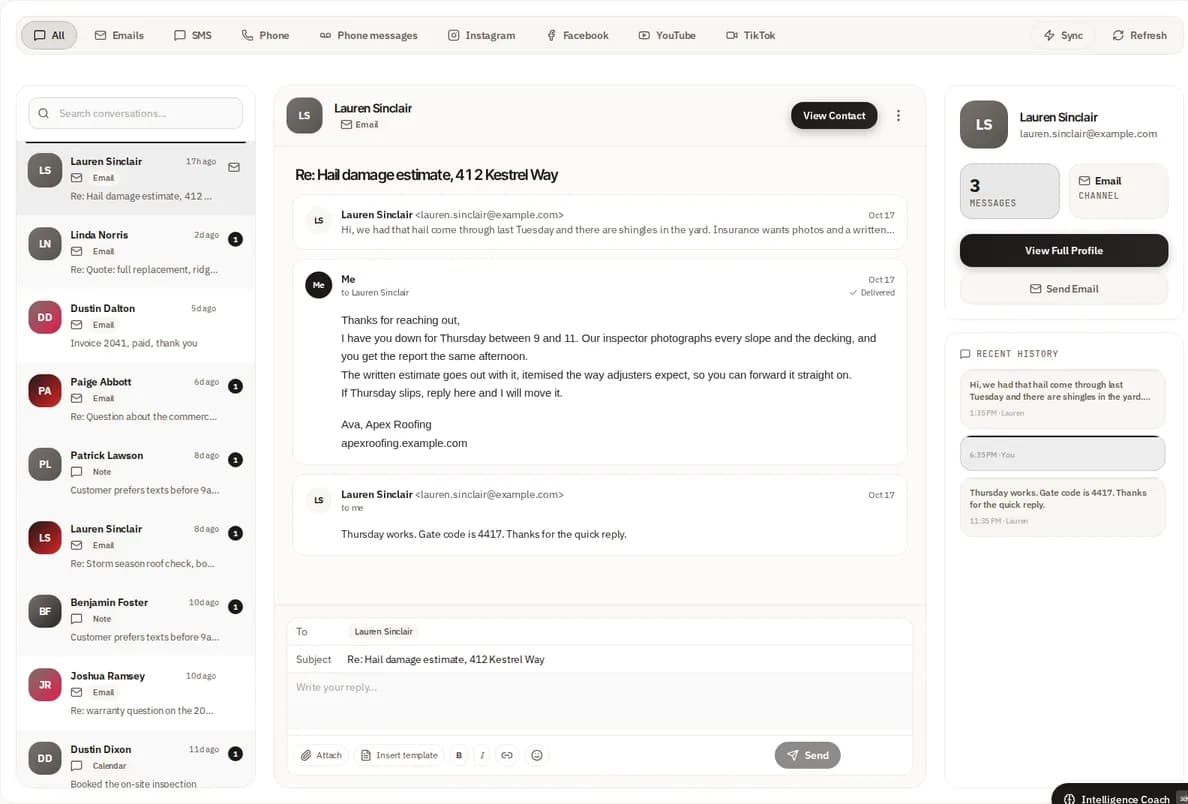
The unified inbox, shown with a demo account.
14
What Is Genuinely Changing, and What Is Not
This category attracts a lot of prediction. Three things are actually changing in a way that matters to a business buying today, and it is worth separating them from the rest.
Agents are moving from steps to workflows. Today most automation handles a step: send this, log that, update the other. The direction of travel is a system that owns the whole sequence, from receiving a lead through researching the company, qualifying by conversation, booking the meeting and briefing the rep. That is already running in production, and it is the difference between a tool that saves typing and one that removes a role's worth of work.
The tooling is converging. Right now most teams run separate products for email automation, lead scoring and document handling, and the gaps between them are where things get lost. Those functions are collapsing into single platforms, which mostly matters because it removes the integration work that quietly eats the benefit.
And it is getting cheaper to deploy. Enterprise automation used to mean a six-figure implementation and a dedicated IT team. The same capability now deploys in days for a business with ten staff. That is the change that actually opens this up.
What is not changing: none of it fixes bad data, and none of it makes a decision your business has not already decided how to make. Those two limits have held through every version of this technology so far and there is no reason to expect them to lift.
15
What an Agent Does That a Workflow Does Not
A conventional workflow executes a defined sequence when a trigger fires. An agent sets its own sub-goals, takes several steps in a row and escalates to a person when something needs judgment. That is the actual distinction, and it is worth understanding because the two words get used interchangeably in this market.
Here is the difference in one example. A new lead arrives. A workflow sends the email you configured. An agent checks the CRM for previous contact with that company, scores the lead, picks which sequence fits based on what it found, sends the first message and updates the pipeline record. Nobody defined that path in advance. It works across hundreds of leads at the same time, which no team can.
The second real difference is that it improves from your own data. A rules engine does precisely what it was told, forever. This reads what happened: open rates inform subject lines, response data informs send times, conversion data decides which sequences get priority. It gets better at your business specifically, because it is learning from your customers rather than from a generic model of them.
The competitive effect is worth being blunt about, because it is the reason to move now rather than later. Every lead answered in the first two minutes is a lead a competitor is still drafting an email to. Every appointment booked automatically is revenue a manual process would have dropped. That advantage is available to anyone who deploys it, which means it is temporary, which is the actual argument for doing it sooner.
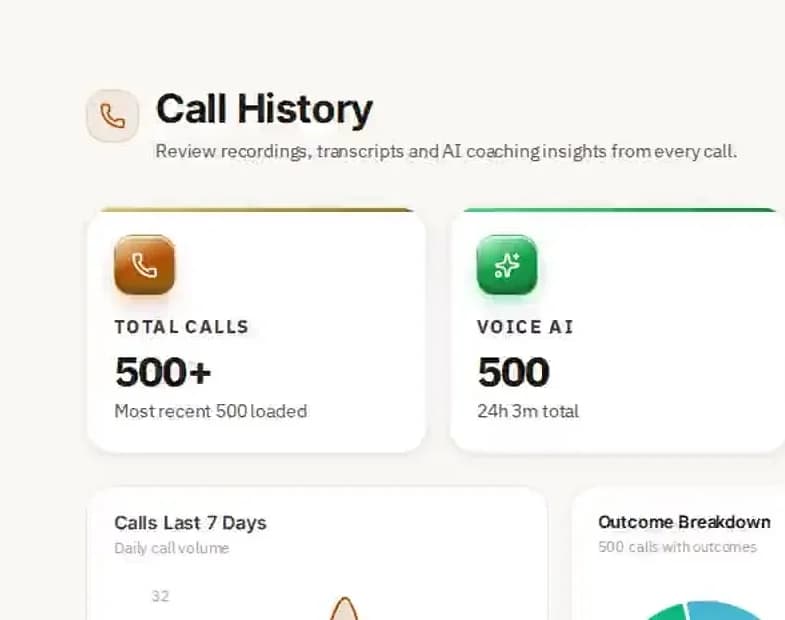
Call history with outcomes and sentiment, shown with a demo account.
16
Support Work Is the Other Half
Support is the other place where the same automation pays, for the same reason: most of what a support team handles is the same short list of questions asked repeatedly, and that is precisely the part that absorbs well.
The system reads inbound messages across email, text, chat and voice, works out what the person wants, pulls the relevant record from your CRM or support tools and answers. For routine work, rescheduling an appointment, updating an account, answering a policy question, it resolves the whole thing without involving anybody.
For anything complicated it routes to a person with the context already loaded, so nobody opens a ticket cold. Response time for routine questions drops from hours to seconds, and the answers are consistent, which matters more than it sounds: most support complaints are about getting two different answers, not about getting a slow one.
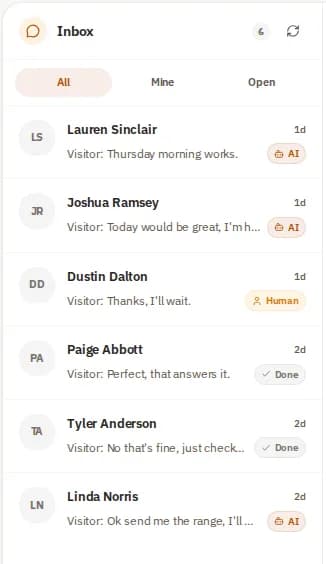
Website chats marked AI, human or done, shown with a demo account.
There is a revenue side to this that most teams miss. Support conversations contain buying signals and churn signals, and both are currently sitting unread in a ticket queue. The system flags an upsell opening and raises an alert when a service interaction looks like the start of a cancellation, which turns support from a cost centre into an early warning system.
And it holds quality at odd hours. Manual support quality tracks the energy and workload of whoever is on shift. This gives the same answer at nine on a Friday night as at nine on a Monday morning.
17
Integration, Governance and Security
None of this works without clean integration, so implementation starts with an integration audit: what systems hold what data, which of them are authoritative, and where the same customer exists twice under two spellings.
Every finished call is sent to your CRM automatically, through Zapier or Make or any CRM that accepts a webhook, and contacts import or export by CSV. Your team keeps working where they already work.
Governance means writing down what the automation is allowed to do on its own, what it must escalate and how its decisions are recorded. Every automation we build logs each action with a timestamp, the trigger that caused it and the data it acted on. That audit trail is not paperwork. It is what lets you answer the question "why did the system email that customer" six weeks later, and you will be asked.
Security gets the same treatment as data handled by staff: access controls, encryption and data minimization. An automation is given access to the data its task requires and no more, and customer data does not go to a third-party model without explicit approval.
One point of confusion worth clearing up: Microsoft Copilot works at a different layer. It helps a person draft an email or a document when they ask it to. This runs at the execution layer, doing the work whether or not anybody is at a keyboard. They are complementary, and a team can sensibly run both.
18
Three Ways This Goes Wrong
Implemented badly, this creates real problems rather than no benefit. The failures fall into three categories and all three are predictable, which means all three are avoidable.
Bad data in. The system acts on what your records say. If your CRM holds duplicate contacts, dead email addresses and fields three people filled in three different ways, the automation will act on all of it, faster and at higher volume than a person would have. We audit data quality and fix the structural problems before building anything, and the governance layer is what stops it degrading again six months later.
Automating the wrong things. A prospect close to a large decision, a customer angry about a service failure, an account that needs a senior conversation: all of those need a person, and a system that handles them smoothly is doing damage smoothly. Escalation rules are defined at setup and they are the most important thing in the configuration. Knowing where to keep a human in the loop matters more than knowing what to automate.
No accountability trail. When software acts without anybody reviewing each action, you need to be able to reconstruct what it did and why. Logging, monitoring and a defined review process are part of the build from day one, not an addition after the first incident.
19
How It Actually Gets Built for You
Most automation software ships as a product you configure yourself, and most of it then sits half-configured, because the configuring is the hard part. That is where the work goes here.
We audit your workflows first and say which ones are worth automating and in what order, including the ones that are not worth it.
We design the sequence architecture, connect the integrations and test against real scenarios before anything reaches a customer.
Once it is live we watch what it produces, change the logic as your business changes and extend it into other parts of the operation when the first set is working. Most clients are live within 48 business hours.
AI that calls your leads in a natural voice, follows up by text and email until they answer, and books qualified meetings straight onto your calendar. Outbound and inbound, on one memory.

















 Multiply Revenue