Skip to content
Back to AI sales manager

The best sales management software for small business: features, AI and cost

What sales management software does, the features a small team actually needs, how AI changes the manager's job and how the best sales management tools compare. Including the parts our own platform does not do.

A brass clipboard behind three rising brass bars and a stopwatch
THE GUIDE

Read it end to end, or jump around.

18 chapters.

What sales management software does

Sales management software is the system a sales manager runs the team from. It holds the pipeline, tracks the activity behind every deal, reports on what is working and gives the manager a way to coach. The best sales management software turns a pile of calls, emails and deals into a short list of things to fix this week.

Most platforms cover the same core jobs. A sales pipeline that shows every deal by stage. Activity tracking, so calls, emails and meetings are logged against the right contact. Reporting and dashboards that show sales performance by rep, by campaign and by stage. Task management and reminders, so the next step on every deal has a date. And some form of coaching, from call recording to scored conversations.

Larger tools add forecasting, territory planning, commission tracking and quota management. Those matter when a sales team has dozens of reps and a finance team asking what next quarter looks like. For a small business with a handful of people, or with AI agents doing most of the calling, the jobs that move revenue are simpler: get more conversations, follow up on time and find out why deals are lost.

That is the lens for this guide. We explain what each feature is for, which ones a small team actually needs, how AI changes the manager's job and how the best sales management tools compare. We also say plainly where our own platform stops.
Sales management software features and capabilities a small team needs

Here are the key features buyers compare, with an honest note on each.

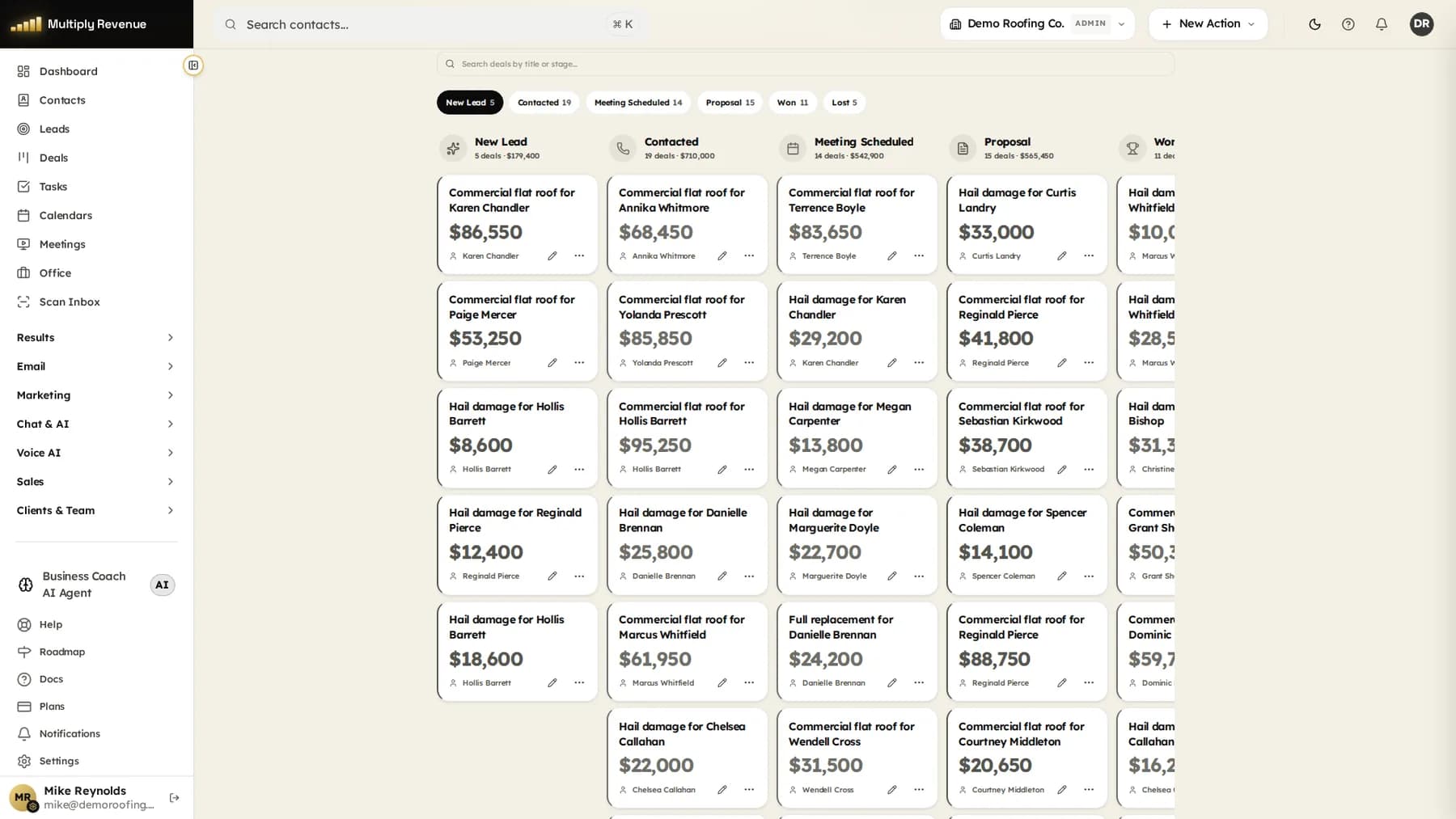
Pipeline management. A visual board of every deal by stage, with drag and drop. Every team needs this. It is the first screen a manager opens in the morning, and the place to see which deals are stuck.

Contact and account records. One record per person and per company, with every call, email, text and meeting attached. Without this, a rep who leaves takes the history with them.

Activity tracking. Calls, emails and meetings logged automatically rather than typed in by hand. Manual logging is where most sales data goes wrong, because busy people skip it.

The deals board in Multiply Revenue, with every deal sorted into stages

Reminders and tasks. A due date on the next step of every deal. Small teams lose more deals to a missed follow up than to a lost argument.

Reporting and dashboards. Sales performance by rep, campaign and stage. The useful version answers one question quickly, such as which campaign booked meetings this month.

Workflows and automation. If this happens, do that. Move a deal when a meeting is booked, send a follow up when a call goes unanswered.

Coaching. Call recording, transcripts and scored conversations, so the manager knows what happened without listening to every call.

Forecasting, territory and commission. Valuable for large sales organisations with a revenue operations team. Often overkill for a team of five, and usually priced like it.

Integrations. The tools you already use, such as your calendar, should connect without a developer.

Customization. Your stages, fields and follow up timing should match how you sell, not how the software vendor imagines you sell. Look for customizable pipelines and fields you can change yourself, without paying for a consultant. Too much customization has a cost too: every custom field is one more thing for the team to fill in, so start simple and add only what you will actually report on.

Ease of use. The best sales management software is the one your team opens every day. A clean, easy interface on a phone matters more for a small team than a long feature list, because a tool people avoid produces data nobody can trust.

Where AI changes sales management

Traditional sales management software records what people did. A manager still has to read the reports, listen to a sample of calls, work out what is going wrong and then persuade the team to change. That loop takes weeks, and most managers only ever hear a handful of calls.

AI changes two things. First, it can listen to every call instead of a sample. A pattern that shows up in forty calls is a pattern, not an anecdote, and AI catches the ones nobody had time to hear. Second, when the calls are made by AI sales agents, the fix does not have to wait for a team meeting. The script can change the same week, and the change can be tested.

That is the job of Bruce, our AI Sales Manager. Bruce listens to every call your AI agents make and take, finds what is losing deals, changes that part of the script and tests the new version against the old one on live calls. The version that books more meetings stays. You get a plain weekly report of what Bruce found, what he changed and what the test showed.

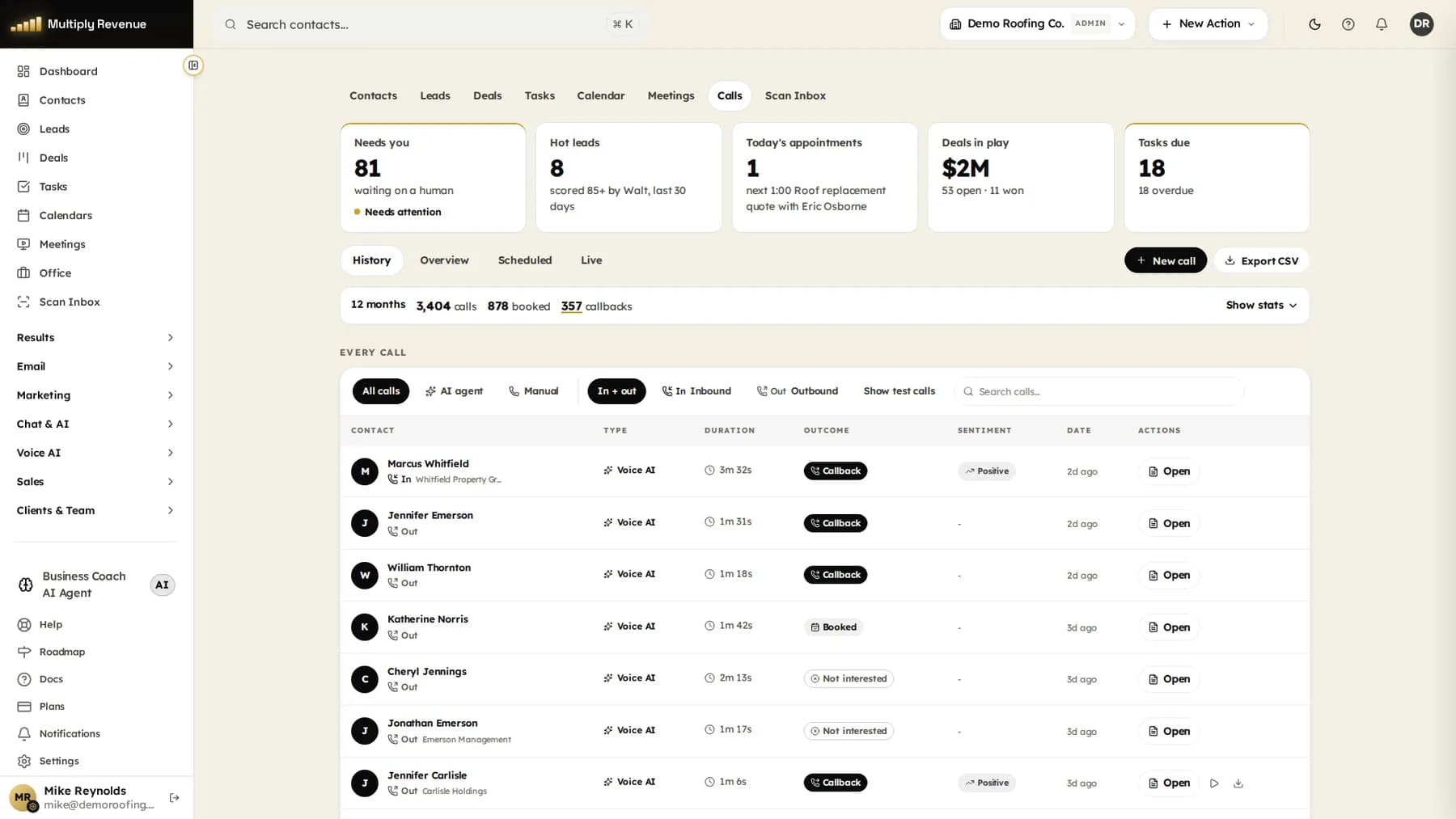
The calls screen in Multiply Revenue, listing each call with its outcome

The point is not to replace the person running the business. It is to give a small team the attention to detail that only large sales organisations used to afford: every call reviewed, one improvement at a time, each one proven before it is kept.

How the AI Sales Manager works, week by week

Bruce runs the same five step loop every week.

Listen. Every call your sales and inbound agents make and take goes into the review, with the transcript and how the call ended. Outbound and inbound both count.

Find. Bruce looks for the moment prospects go quiet. The question that comes too early, the objection that never gets answered, the follow up that goes out a day too late. He points to the exact moment in the transcript where calls turn.

Change. Bruce rewrites that one part of the script and leaves the rest alone. One change at a time, so the result is clear.

Test. Half the calls get the new version and half keep the old one, on live calls with the same kind of leads.

Keep. The version that books more meetings stays, the other is dropped and you get the reason in plain words. Then Bruce starts on the next one.

Here is the kind of change Bruce makes. Prospects kept going quiet when the price came up before the agent knew anything about their job. Bruce moved one question ahead of the price and tested both versions. Same agent, same leads, one line moved.

You stay in control. Every change is written down with the reason and the test result, and you can undo any of them. Bruce never tunes away the agent saying it is an AI assistant or that the call is recorded. On the Done for you plans a person from our team checks each change as well.

The Sales Manager and the AI Business Coach: two different jobs

Two of our agents look at your calls, and they do different work.

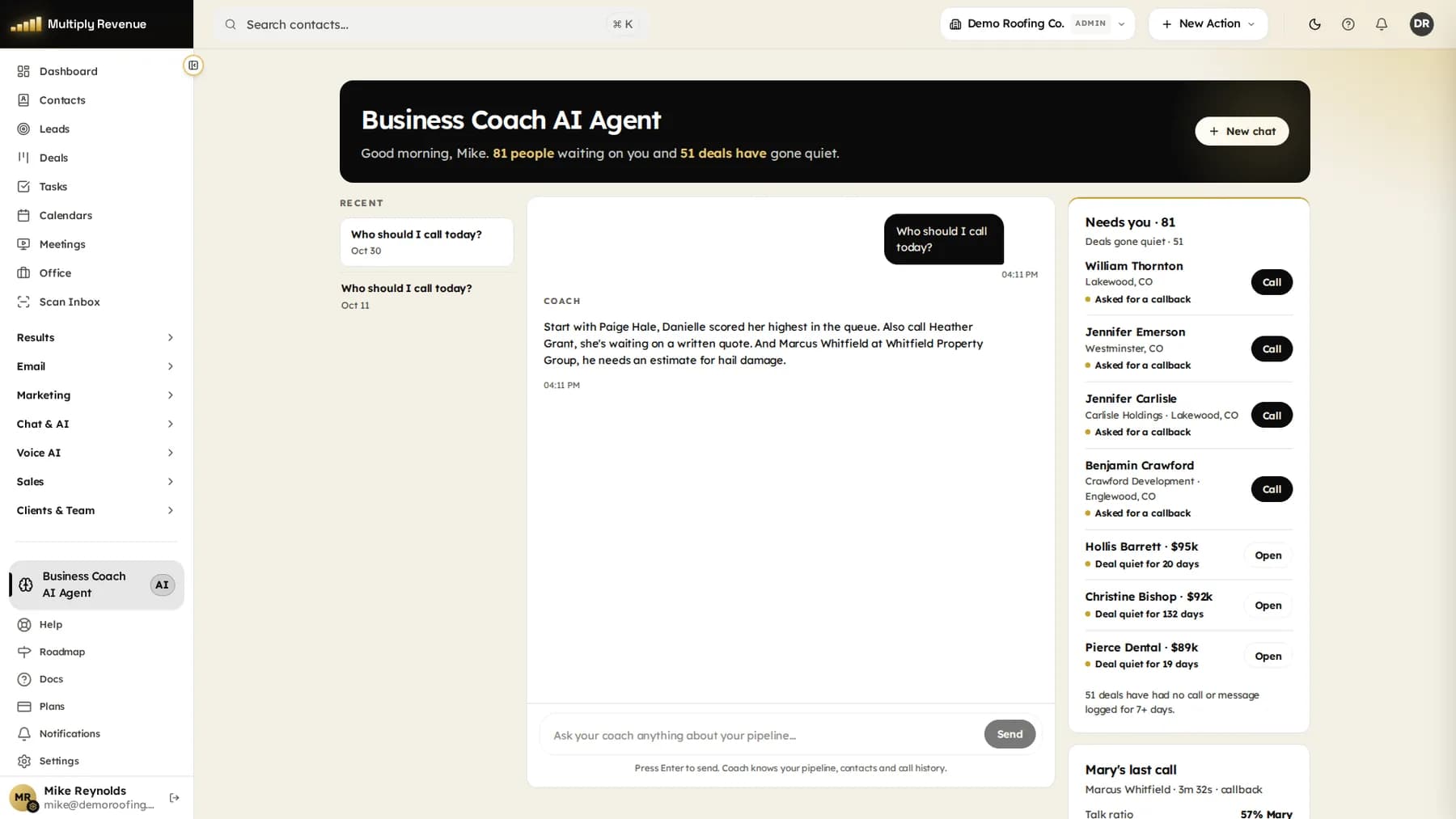
The AI Business Coach scores calls and answers your questions, so you know what is happening. It reviews conversations, shows why deals were won or lost and briefs you before a call. The Coach scores your team's own calls as well, including your people on Enterprise.

The AI Sales Manager acts on what the scores show. Bruce rewrites the opening, the objection handling or the follow up timing for your AI agents and proves the change works before keeping it.

The AI Business Coach screen in Multiply Revenue, with scored calls

A simple way to remember it: the Coach diagnoses, the Sales Manager treats. Most sales management platforms stop at the diagnosis. They give you dashboards and leave the change to you. When your calls are made by AI agents, the change can be made and tested for you, which is the part that actually moves the number of booked meetings.

Automation: deal pipelines, reminders and workflows in the same CRM

Bruce works inside a full CRM, so the calls he tunes and the deals they create live in one place.

The sales pipeline shows every deal by stage on one board. When an agent books a meeting, the deal is already there with the call attached, so nobody has to type it in. Your team can run several pipelines side by side, for example one for new business and one for past customers.

Contacts carry the whole history. Every call, email, text and meeting lands on the contact record, with the transcript and the outcome. When a rep picks up a deal, they see what was said, not just that a call happened.

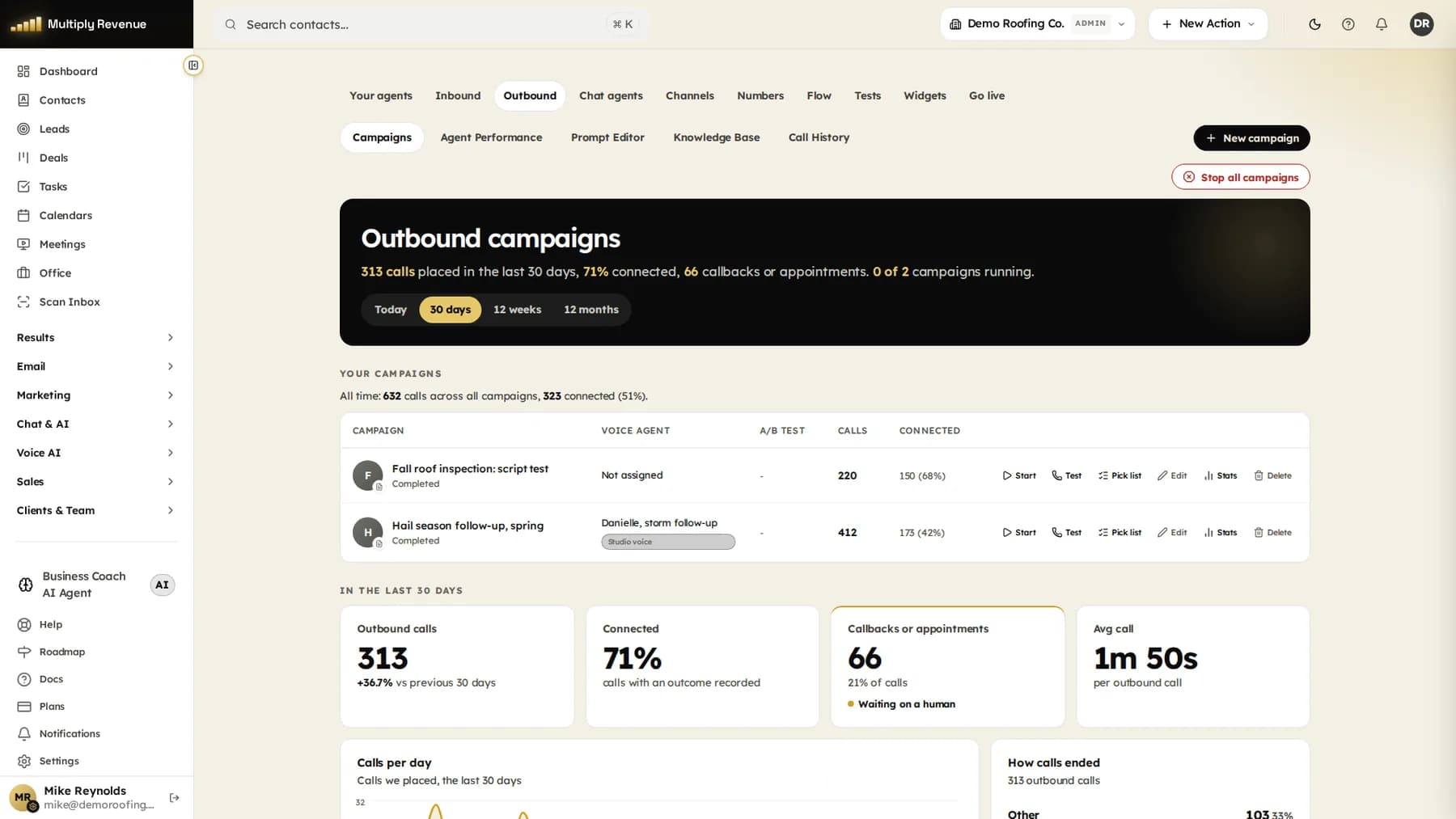
Follow up runs on a schedule you set. Leads who do not answer get called again, emailed and texted from your own Android phone, until they answer or opt out. Reminders put a date on the next step for the deals your people handle.

The campaigns screen in Multiply Revenue, showing outbound campaigns and their results

Automation workflows handle the if this, then that. Move a deal when a meeting is booked. Start a follow up when a call goes unanswered. Tag a contact when they ask about a specific product.

The result is a sales process where activity tracking is automatic. Calls and meetings log themselves, so the reports are built from what actually happened.

Sales analytics and dashboards a manager can read in one minute

Most sales reporting tools give managers more charts than they have time to read. The useful report answers a few questions quickly.

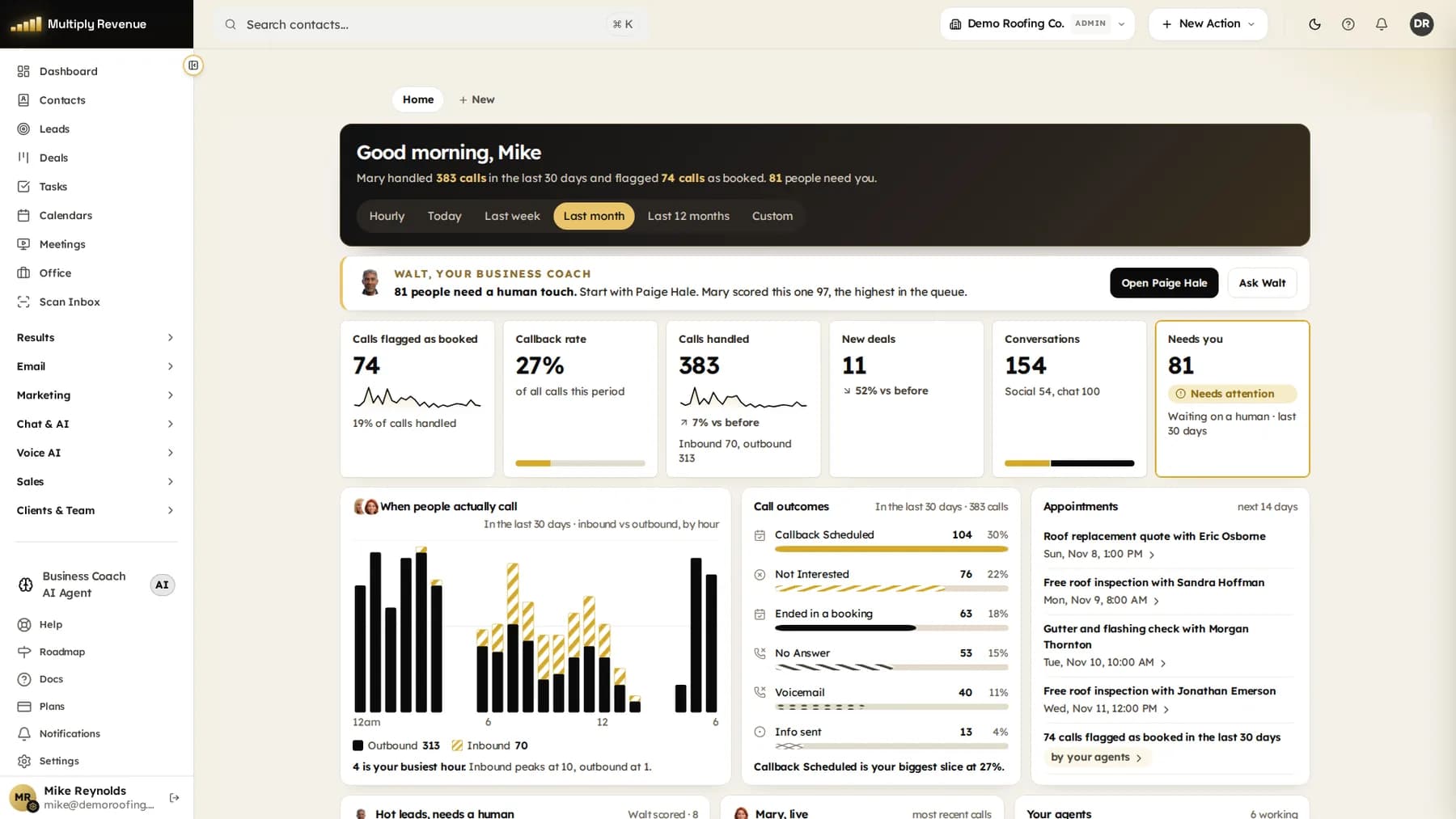
Which campaign booked meetings this month? The dashboard ties every booked meeting back to the call that earned it, so you can see which list, which script and which agent produced revenue.

Where do deals stall? Pipeline reporting shows how many deals sit in each stage and for how long. A stage that fills up and never empties is where a sales process is broken.

The Multiply Revenue dashboard with meetings booked and pipeline value

What changed this week? Bruce's weekly report is written in plain words: what he found, what he changed and what the test showed. It is the report a good sales manager would write after listening to every call.

How is each agent doing? Sales performance by agent and by campaign shows calls made, conversations held and meetings booked.

Good reporting is a habit, not a feature. Pick two numbers that matter, such as meetings booked and deals won, and look at them every Monday. The rest is detail you open only when one of those two numbers moves.

What our platform does not do: forecasting, territory and commission

Sales management software covers a lot of ground, and we would rather you know where we stop before you buy.

Sales forecasting models. We do not build revenue forecasts with weighted probabilities or AI predictions of next quarter. You see the value of your pipeline by stage, but if your board or lender expects a formal forecast, a dedicated forecasting tool or a larger CRM is the better fit.

Territory management. We do not split regions or accounts between reps by territory rules. Small teams rarely need it. Field sales organisations with many reps do.

Commission and quota tracking. We do not calculate commissions or track reps against quota. Spreadsheets or a dedicated compensation tool do this job.

Coaching human reps on scripts. Bruce tunes the scripts your AI agents use. Your people's calls are scored by the AI Business Coach, but Bruce does not rewrite what a human says.

If these features are central to how you sell, a larger platform is probably right for you. If your real problem is not enough conversations, slow follow up and not knowing why deals are lost, that is the gap our platform is built for.

Team collaboration: one customer record the whole team works from

Sales management is a team sport, even in a business of three people. The owner closes, someone books the jobs, someone else answers the phone on a Saturday. Collaboration breaks down when each of them keeps their own version of the truth.

The fix is one customer record that everyone works from. In our platform every call, email, text, chat and meeting lands on the same contact, whether an AI agent handled it or a person did. When a customer calls back, whoever picks up sees what was said last time, what was promised and what the next step is.

Hand offs stop dropping things. When an AI agent books a meeting, the person taking it sees the transcript and the questions the prospect asked. When a salesperson goes on holiday, their deals are still visible in the pipeline with the history attached, so a colleague can pick them up without a phone call to the beach.

Everyone sees the same pipeline. Deal stages, values and next steps are shared, so the Monday meeting is about decisions rather than about whose spreadsheet is right.

Unlimited users are included on every plan, so adding the person who answers the phone or the partner who wants to see the numbers does not add a seat cost.

The AI agents share the same memory. Our sales agent, customer service agent, live chat agent and follow up agent all read and write one record, so a customer never has to repeat themselves because they moved from a chat to a phone call.

Cloud based sales management software: what changes for a small business

Almost all modern sales management software is cloud based. There is nothing to install, updates arrive without anyone doing anything and the data is reachable from any device with a browser. For a small business that changes a few practical things.

Work from anywhere. A contractor between jobs, an owner at a trade show and an office manager at a desk all see the same pipeline. Our platform runs in the browser on a computer, a tablet or a phone.

No server to look after. The vendor runs the infrastructure, the backups and the security updates. Ask any vendor where the data is stored, how it is backed up and how you can export it if you leave. With us your contacts and records are yours, and you can export your contacts from your account at any time.

Predictable cost. Cloud software is a subscription, billed monthly or annually. Annual billing usually costs less in exchange for paying the year up front, and the true comparison is the total for the whole team over twelve months, including any usage charges such as calling minutes.

Faster set up. A cloud platform can be live in days rather than months, because there is no hardware and no installation project. The time goes into the parts that matter: importing your contacts, setting up the pipeline stages and writing the scripts.

The trade off is dependence on the vendor. Choose one that is clear about what it does, what it costs and what happens to your data, and read the contract before you sign.

Signs your sales team has outgrown spreadsheets

Most small businesses start sales management in a spreadsheet, an inbox and someone's memory. That works until it quietly stops working. These are the signs it is time for real sales management software.

Follow ups slip. A lead asked for a quote on Tuesday and nobody called back until the following week. Nobody decided to ignore them. There was simply no reminder.

Nobody knows the pipeline. Ask how many deals are open and what they are worth, and the answer takes an afternoon. A manager cannot plan from a number nobody trusts.

History walks out the door. When a salesperson leaves, their notes, their contacts and the context of every conversation leave with them.

The same mistakes repeat. Deals are lost at the same point for the same reason, month after month, because nobody has the time to listen back and spot the pattern.

Growth means more admin, not more sales. Every new lead source adds another tab, another login and another copy and paste job.

If two or more of these sound familiar, the cost of not having a system is already higher than the cost of one. The fix is not more effort from the team. It is one record per customer, automatic activity tracking and a follow up that happens whether or not anyone remembers.

Common sales management mistakes, and how software fixes them

Buying sales management software does not fix a sales process on its own. These are the mistakes we see most often, and what the right tool changes.

Tracking activity instead of outcomes. Counting calls and emails is easy, so it becomes the goal. Calls are an input. Meetings booked and deals won are the outcome. Good reporting puts the outcome first and shows which activity produced it.

Coaching on a sample. A manager who hears three calls a week is guessing about the other three hundred. AI that reviews every call turns guesses into patterns you can act on.

Changing everything at once. A new script, a new offer and a new list in the same week means nobody knows what worked. Change one thing, test it against the old version and keep the winner. This is exactly how Bruce works.

Letting follow up depend on memory. Most deals are not lost in the first conversation. They are lost in the silence after it. Automated follow up on a schedule you set closes that gap.

Buying for the team you might have in five years. Enterprise platforms built for hundreds of reps bring setup, admin and seat costs a small team pays for and never uses. Buy for the team and the problem you have now.

Forgetting the customer's experience. Every automated call, text and email still represents your business. Disclosures, opt outs and a respectful tone are not optional extras, and good software keeps them in place by default.

Customer data to measure when AI agents make the calls

When AI agents make and take your calls, the numbers a sales manager watches change a little. Volume is no longer the constraint, so the useful measures are about quality and conversion.

Conversation rate. Of the calls placed, how many reached a person and turned into a real conversation? This depends heavily on the list and the time of day, which makes it the first thing to check when results dip.

Meetings booked per hundred conversations. The cleanest measure of the script itself. When Bruce tests a change, this is the kind of number that decides the winner.

Show rate. A booked meeting is only worth something if the prospect turns up. Reminders and a clear confirmation lift it, and a falling show rate often points to meetings booked too far ahead.

Where calls end. The point in the conversation where prospects go quiet or say no tells you which part of the script to fix next. Transcripts make this visible without listening to every call.

Follow up conversion. How many deals come from the second, third or fourth touch rather than the first. If almost none do, the follow up is too slow, too generic or stops too soon.

Revenue by campaign. Finally, tie the meetings back to the deals they became. A campaign that books fewer meetings but closes more of them is the better campaign.

Engagement over time. Watch how prospects respond across the whole sequence, not just the first call: who opened the email, who replied to the text, who picked up on the third try. That engagement data shows which leads are warming up and deserve a call from a person next.

Our dashboard ties every booked meeting back to the call that earned it, so these numbers come from what happened on the calls rather than from a spreadsheet someone updates on Friday.

The best sales management software compared

Most small business shortlists for the best sales management software include the same familiar names. Here is what each is known for, in general terms. Plans and prices change often, so check each vendor's own pricing page. For side by side detail with dated prices, see our sales tracking software comparison, our HubSpot comparison and our Pipedrive alternatives guide.

HubSpot Sales Hub. A broad platform with a free CRM to start and paid plans that add sequences, forecasting and reporting. Strong when marketing and sales share one system.

Salesforce Sales Cloud. The enterprise standard, highly customizable, with deep forecasting and territory features. Best with an admin to run it.

Pipedrive. A visual deal pipeline built around the next activity on every deal. Popular with small sales teams that want a focused tool.

monday CRM. Pipelines, projects and tasks on one flexible work management platform. Good for teams that like to shape their own boards.

Zoho CRM. A wide feature set inside a large family of business apps. Good value for teams willing to spend time on customization.

Salesmate. A sales CRM with built-in calling, texting and sequences for small and mid sized teams.

Multiply Revenue. A CRM with AI sales agents built in that call, follow up and book the meeting, plus Bruce, who listens to every call and tests improvements to the script. Built for businesses whose problem is filling the pipeline, not only organising it.

The others manage the leads you already have, and most do it well. Every deal still moves because a human moved it. If the pipeline is thin, the tool also needs to start conversations.

How to choose sales management software for a small business

Start with the problem, not the feature list. Five questions sort most buyers.

Who makes the calls? If human reps make every call, look for strong activity tracking, reminders and coaching. If you want AI agents to make and take calls, look for a platform where the agents, the pipeline and the reporting share one record, so nothing has to be copied between tools.

Is your pipeline full or thin? A full pipeline needs organisation. A thin pipeline needs new conversations, which most sales management tools do not create.

How big is the team? Per seat pricing adds up as the team grows. Platforms that include unlimited users change the maths for growing teams.

What must it connect to? List the tools you cannot give up. Our platform connects with GoHighLevel and Google Calendar today. If another system is essential, check the integration before you buy, with any vendor.

Who will set it up? A powerful platform nobody configures is worse than a simple one that is used every day. Ask who does the setup, how long it takes and what happens when something breaks.

Then run a short pilot on real work. Load one real list, run one real campaign and judge the tool on the number that matters to you, such as meetings booked.

Questions to ask in a sales management software demo

A demo is built to show a product at its best. These questions show you how it will work on an ordinary Tuesday.

Can you show me this with my own list? A demo account full of perfect sample data hides how messy real contacts are. Ask to see an import of a few hundred of your own records.

What happens after a call ends? Watch where the call, the transcript and the next step land. If someone has to copy anything by hand, that step will be skipped on a busy day.

What does it cost for my whole team for a year? Ask for the total, including seats, usage such as calling minutes, add-ons and any onboarding fee. Compare that number, not the price of one seat.

Who sets it up, and how long does it take? Ask who does the work, what they need from you and what the first week looks like.

How do I get my data out? A good vendor answers this without hesitation.

What do your AI features actually do today? Ask to see them working on a real call or a real record, not a slide. Ask which features are included in the plan you are quoted and which cost extra.

What will you not do for me? The honest answer tells you more about a vendor than the feature list does. Ours is in the chapter above.

Sales management software pricing, and which plan includes Bruce

Sales management software is usually priced per user per month, often billed annually, with the advanced features such as forecasting held back for the higher tiers. Some vendors add onboarding fees. Always compare the total for your whole team over a year, not the headline price for one seat.

Our plans are $97, $297 and $497 a month, with unlimited users, no setup fee and no long term contract. AI phone call minutes are included every month, then billed by the minute at the rate shown on the pricing page.

Bruce sits on the higher plans. Pro includes the weekly report with the exact fixes to make. Enterprise adds Autopilot, where Bruce makes the fixes and tests them for you. Every Done for you plan includes the full version, with a person from our team checking each change, whichever plan it sits on. Starter on its own does not include the AI Sales Manager.

The CRM itself, the pipeline, contacts, reminders, reporting and the AI Business Coach, comes with every plan.

Getting started

Setting up our sales management platform follows the same steps for most businesses.

Bring your list. Import your contacts and past customers so the agents have people to call, and add in-market audience data for your email campaigns and ads.

Set the script. Your agent's opening, questions and answers are written with you, in your words and your offer.

Connect your calendar. Meetings book straight onto Google Calendar, against your real availability.

Let the agents work. They call, follow up and book. Every call, transcript and outcome lands in the CRM.

Let Bruce manage. Once there are enough calls to learn from, Bruce starts the weekly loop: listen, find, change, test, keep. You read the report, keep what works and undo anything you do not like.

If you would rather not do the setup yourself, the Done for you plans include it. We set it all up with you and a person from our team checks every change Bruce makes.

QUESTIONS

More questions, answered

Ask a question
What is sales management software?

Sales management software is the system a sales team and its manager run the sales process from: the pipeline of deals, the record of every call and email, reminders for the next step, reports on what is working and tools for coaching. The best sales management software for a small business keeps that in one place and fills most of it in automatically.

What is the difference between a CRM and sales management software?

A CRM stores customers and the history with them. Sales management software adds the manager's view on top: pipeline reporting, activity tracking, coaching and the tools to improve the process. Most modern sales CRMs, ours included, do both in one platform.

Does a small business need sales forecasting?

Usually not at first. A clear view of the pipeline by stage and an honest weekly look at meetings booked and deals won tells a small team most of what a forecast would. Formal forecasting tools earn their cost when a business has many reps or lenders and investors asking for projections. We do not sell a forecasting model, and we say so.

Can sales management software make calls for my team?

Most cannot. They organise the calls your people make. Multiply Revenue includes AI sales agents that call your leads, follow up and book meetings, and Bruce, the AI Sales Manager, who reviews those calls and tests improvements to the script.

How long does setup take?

On the Done for you plans we set it all up with you, and you can be live in about 48 business hours. If you set it up yourself, the time depends on how much you import and how many campaigns you start with.

THE REST OF THE PLATFORM

Questions about pricing, setup and what it will not do are answered back on the AI Sales Manager page.

See what it would change on your calls.

Fifteen minutes. Your industry. Real answers.

Book a demo

The playbook, monthly.

One email a month on what is booking meetings in real call data, and what we changed because of it.

One email a month. Unsubscribe any time.

Multiply Revenue

AI CRM software with agents that call your leads in a natural voice, follow up by email and by text from your own Android phone, and book meetings onto your calendar. Outbound and inbound, on one memory.

No setup fee on any plan, and no per-text charge from us.

© 2026 Multiply Revenue · 1905 Sherman Street, Ste 200, Denver, CO 80203 · (720) 735-8685
Book a demo