Skip to content
Back to in-market audience data ยท sold on its own

B2B data provider guide: in-market data and a B2B database

What a B2B data provider has to deliver for a small business: accurate contact data, fresh in-market leads, enrichment and a way to act on them. How to compare data providers and what to check before you buy.

A brass magnifying glass over a stack of stone cards with one brass card lifted out
THE BASICS

Start here, the plain-words version.

10 chapters.

What a B2B data provider is, and what to compare

A B2B data provider sells information about businesses and the people who run them: company details, contact data such as business emails and direct lines, and sometimes signals about who is buying. The business data provider you pick decides how many of your outbound calls reach a real person, so it is worth comparing data providers on a few plain features rather than on the length of a feature list.

The checks that matter are accuracy, freshness, what comes in each record, how it reaches your pipeline and what it costs to use the lists, not only to buy them. Our answer on each is in the chapters below, and you should ask every provider the same questions, us included.

Contact data and data enrichment

Contact data is the part of a record you act on: the company, the contact name, the business line and the email. Data enrichment is the process of filling in what a record is missing and keeping the rest current, so the information your team sees is as current as we can make it, though some of it will always age.

The B2B Database delivers a hundred thousand decision makers, sourced from commercial data providers and refreshed regularly. In-Market Data adds timing on top. Together they give you accuracy you can measure from a sample export, which is the only test worth trusting from any provider.

B2B data providers compared: Apollo, Lusha, Cognism, Clearbit, LeadIQ and Clay

Providers such as Apollo, Lusha, Cognism, Clearbit, LeadIQ and Clay are well known for contact data, lead search and enrichment, and each suits a different kind of team. Tools built around LinkedIn Sales Navigator and Leadfeeder start from a different place again: professional network search in one case and website visitors in the other. Check each one against your own needs rather than a ranking.

What we focus on is different in one way. The record is built around buying activity: businesses searching for what you sell this week, with a contact attached, delivered to your CRM so the outbound campaign starts on the same day. If you already use one of these tools, the records can sit next to the ones you have, and your dashboard shows which source books more meetings.

From B2B leads to pipeline

Leads only matter once somebody works them. The records land in your CRM as contacts, your AI sales agent calls the business line, and the follow up goes out by text and email from the same conversation. That is how a list becomes pipeline without an extra tool for outreach, a dialer and a sequence.

For outbound teams this removes the gap where a bought list sits unused. The account shows records delivered, conversations had and meetings booked, so you can judge any data vendor by what it produces for you.

How the intent signals work

The signals come from what businesses do when they are shopping: searches on Google and Bing with buying words in them, and forms filled in on Facebook and Instagram asking about what you sell. A business that did that this week is in the market, and the record shows the company, the contact and the business line so your agent can act on it.

The data is business to business. It identifies companies and the people who run them on their business lines. It never includes consumer lists, home numbers or cell numbers for calling, and that is a rule, not a setting.

Who it is for

Any business that sells to other businesses and has more capacity than leads: contractors who want commercial work, agencies, dealers, suppliers, clinics with corporate accounts, consultants. If your best month came from being first to a company that was already looking, this is a way to be first on purpose.

It is not for consumer marketing. If you sell to households, the website chat, the social tools and the inbound agent on the same platform are the better fit, and we will say so on the demo.

In-Market Data and the B2B database together

In-Market Data tells you who is shopping now. The B2B database, 100,000 decision makers in one delivery, tells you who fits your market even when they are not shopping yet. Many buyers run both: the in-market records go to the agent first, and the database fills the list for the slower, steady outreach.

Both are add-ons to any plan. What you upload and what happens in your account is never shared with other businesses, and we do not sell your customers' data to anyone. The records themselves are not exclusive.

In-Market Data next to the big intent data providers

The well known intent data providers sell account level buying signals to enterprise sales and marketing teams: a dashboard of companies warming up on a topic, priced for a team that has analysts to read it and a sales development team to act on it. Useful at that scale, and far more than a small business needs or can use.

In-Market Data is built for the other end of the market. The buying signals are already turned into a record with a company, a contact and a business line. There is no dashboard to learn, because the record lands in your CRM and your agent calls it. You identify the accounts that are actively buying, engage them the same day and see the conversion in booked meetings, not in an intent score.

What a good first month looks like

Start with one campaign: your main service, your service area, in-market records only. Let the agent call every record on its business line within a day of delivery, qualify to your rules and book the ones that fit. Read the transcripts at the end of week one, because the questions buyers ask tell you what your website should say.

By the end of the month you know three numbers: records delivered, conversations had and meetings booked. That is the whole case for intent data, and it is measured in your own account rather than promised in a sales deck. Then decide whether to add the B2B database for the steady list, or more in-market volume, or both.

Two habits make the month work. First, call the same day: a buyer intent signal is worth most in the first twenty four hours, when the company is still comparing. Second, keep the follow up on: a business that did not pick up on Tuesday is still shopping on Thursday, and the agent's texts and emails from the same record are what turn a near miss into a meeting.

Both are automatic here, but they are worth knowing, because they are the two places where a bought list usually goes to waste. If you already have a list of your own, the agent can work it alongside the in-market records, and the dashboard shows which of the two is booking more meetings for you.

How to choose a buyer intent data provider

Ask how fresh the data is: a signal from last quarter is a list, not intent. Ask what a record actually contains, because an account name without a contact or a line to call is homework, not a lead. Ask whether the provider can reach the business lawfully: for calling, that means business lines and a clear disclosure, every time.

Then ask what it costs to use the data, not only to buy it. If you need three more tools to act on a signal, the real price is the sum of all four. Our answer is one platform, with the agents, the CRM and the calendar already in it, and the data as the add-on that makes them run.

THE GUIDE

Read it end to end, or jump around.

22 chapters.

What You Get, and What You Do Not

In-Market Audience Data is sold on its own. You do not need a plan to buy it, and it does not need our platform to be useful. Here is the whole product in one place, so nobody finds out the shape of it after paying.

What it has. Businesses that are shopping for what you sell right now, in four industries in your state, delivered every day. The records come from what people did in the last day to the last week: searches on Google and Bing, and forms filled in on Facebook and Instagram.

Every record carries the company, a contact name, the business line, an email and the industry, sourced from commercial data providers and refreshed regularly. A hundred thousand B2B records a month come with it. You can email them, run voice AI campaigns to their business landlines, or load them into your own CRM and ad accounts.

What it does not have. It is not a consumer list and it carries no cell phone numbers for calling. It is not a guarantee of volume in a thin market; four industries in a large state produce far more than four in a small one, and we say so before you pick them. It does not run your campaigns for you unless you put it on a plan with the agents. And it is not the B2B Database below, which is a different product with a different job.

Two stone trays, one holding brass balls and one filled with fine brass grain

B2B Database: What It Has, and What It Does Not

The second data product, also sold on its own, and the two are easy to confuse because both arrive as records with names and numbers on them.

What it has. A hundred thousand decision makers in one delivery, filtered to your industries and your geography, with direct lines rather than switchboards and company LinkedIn pages, delivered in up to 2 business days. Records are sourced from commercial data providers and refreshed regularly. People change jobs and businesses move, so some records will be out of date. It is the list you dial when you want breadth, and it is what keeps a CRM current without anybody typing.

What it does not have. Timing. A B2B record tells you who fits your market, not whether they are shopping this week; that is what the In-Market product adds. It carries no email addresses, no consumer data and no cell numbers for calling. It does not promise that every record answers, because no list can. And it is not exclusive: a decision maker exists in the world once, and other people can find them too. What is exclusive is the freshness of the check and the filter that means you are dialling your market and nobody else's.

Most buyers who take both use the In-Market file for this week's calls and the B2B file for the campaign that runs underneath it.

A dark stone card standing upright beside a row of small brass balls and stacked stone tiles

What In-Market Audiences Are

An in-market audience is a set of people or businesses who are shopping for what you sell right now. Not people who fit your customer profile, which is most of the market most of the time, but the much smaller group whose behaviour this week says they are actively looking: searching, comparing, reading reviews, sitting on a competitor's pricing page.

In Google Ads the term has a specific meaning. Google builds these segments itself from behaviour across Search, YouTube and the Display Network, and drops a user into a category when their activity suggests they are close to buying.

We use the same idea outside advertising. We identify businesses showing those signals across our own monitoring network, then match them to a named contact, so what your team gets is not a segment to bid on but a name and a number to call.

The practical difference is where the effort goes. A cold list spends most of your team's day on people with no current need, and there is no way to tell which ones those are until somebody has already made the call. Starting from behaviour reverses that: the list is short, and the reason each name is on it is attached to the record.

Brass balls pouring into a silver funnel and collecting in a bowl below

Why Timing Beats List Size

The average B2B contact list is 30 to 90 days old by the time it reaches a sales team. Calling somebody who searched for your service three months ago is a cold call with extra steps, because the decision has usually been made and you were not in it.

Only a small fraction of any list is in the market at a given moment. That is not a data quality problem, it is arithmetic: most businesses are not buying most things most of the time. Dialling for volume means paying your team to find that fraction by hand, one conversation at a time.

The alternative is to sort the list by behaviour before anybody picks up a phone.

A brass ball beside a brass stopwatch

How We Find Active Buyers and Get Them to Your Team

We watch what people do online when they are looking for services in your category: what they search for on Google and Bing, and the forms they fill in on Facebook and Instagram, continuously. The window is short on purpose. A record can be a day old or a week old, never last quarter's.

Every prospect carries an activity score built from first-party, second-party and third-party signals combined. A business that searched, then visited a competitor, then downloaded a comparison guide inside one week scores far higher than one that did a single search, because the pattern is what indicates a real process rather than idle curiosity. Two moments count the most: a business looking at prices for the service you sell, and a sudden jump in how much it is researching. Those go to the top of the file.

We match those active businesses to contact records, name, title, direct phone and email, from a database covering millions of companies, so your team reaches the person who decides rather than the switchboard.

The list arrives every morning, in your dashboard or as a CSV file you can import into any CRM. Each record carries the specific signals that put it there, which is the part that changes the call. A rep opening with the thing that person was actually researching is having a different conversation from one reading a script.

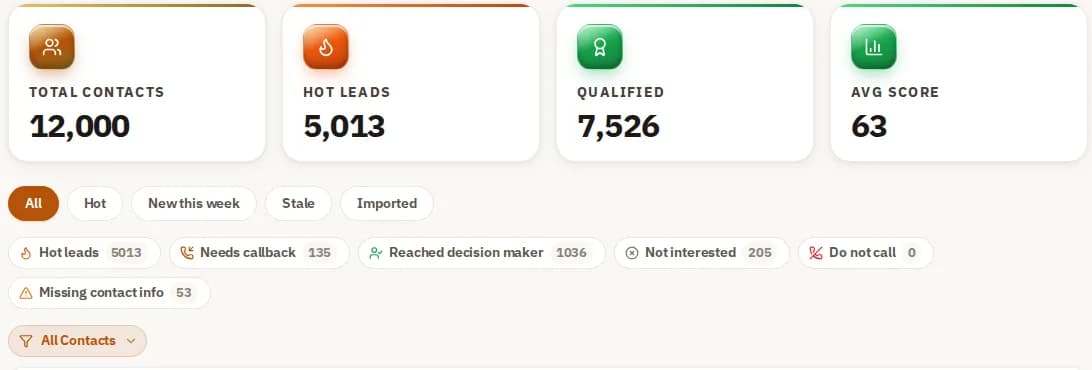
The Contacts screen with total contacts, hot leads, qualified and average score, plus quick filters such as needs callback and do not call
Contacts sorted by what to do next, shown with a demo account.

The Seven Signals Worth Tracking

Businesses give away a purchase decision in seven places, and we track all seven. None of them is conclusive on its own. Together they are, which is why the scoring matters more than any single event.

Search queries. Searches directly related to your category are the strongest early signal and usually the first one to appear. We capture the query pattern rather than a single search, because one search is a question and five is a process.

Competitor site visits. Repeated visits to competitor sites, pricing pages or comparison tools mean somebody is in evaluation rather than research.

A brass magnifying glass over a stack of dark stone cards with a brass card on top

Content downloads. A whitepaper, a buyer's guide, an ROI calculator or a case study is a deliberate act that costs the person their email address, which is why it scores heavily.

Form fills and demo requests. Contact forms, demo requests and trial sign-ups on competitor sites are the strongest signal available, because at that point the shopping is nearly over.

Professional network activity. Engagement with industry posts, competitor pages and trade groups adds context to the rest, and rarely means much alone.

Comparison behaviour. Several competitor visits, pricing pages and case studies inside a short window is the clearest pattern there is: they are choosing between named options.

A stream of brass balls falling onto a dark stone slab and scattering across the floor

Review platform activity. Time on G2, Capterra, Trustpilot, Google Reviews or Yelp is late-stage behaviour. People read reviews when they have a shortlist.

Every signal is scored, matched to a contact and delivered, which is the step that turns an observation into a phone call.

Using Intent Data in Paid Campaigns as Well as on the Phone

Intent data is not only for outbound calling. The same records can be fed into an ad account, and the principle is identical either way: reach a buyer while the decision is still open.

Four things are worth knowing if you run paid campaigns alongside outbound.

Start in observation. Apply an audience as an observation layer first, so you can see how the segment actually performs on your account before you raise bids or narrow reach on the strength of a theory.

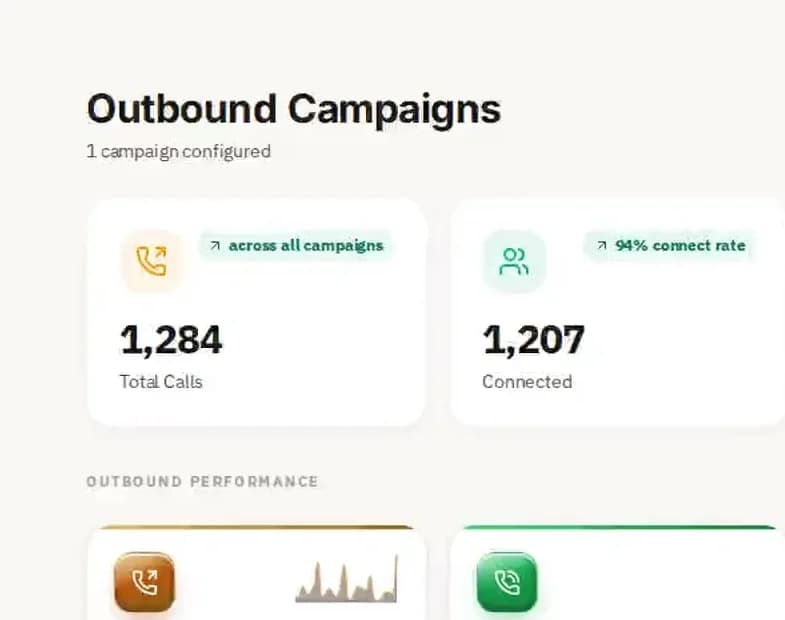
The Outbound Campaigns screen in Multiply Revenue showing total calls, connect rate, callbacks and average call duration
The outbound campaigns screen, shown with a demo account.

Affinity and in-market do different jobs. Affinity builds awareness earlier in the process, in-market catches people at the end of it. Running both is not redundancy, it is covering two different moments.

Demographic overlays tighten the target. Age, income and household status on top of a segment narrows it to the people who can actually buy, which matters most in consumer categories.

Build your own segment. A custom segment built from your own converting keywords and your competitors' URLs will usually beat a predefined category, because it is shaped like your business rather than an industry average.

Where Intent Data Is Going

Third-party cookie targeting is being phased out, and that changes what a durable targeting strategy looks like.

Businesses building an intent data foundation now are building something that survives that, because behavioural signal collected under consent and matched to a business contact does not depend on a cookie following somebody around.

Automated bidding already takes audience signals as an input rather than a filter, and that dependency is growing rather than shrinking.

Stone steps rising to the right with a brass ball on each step

The direction is one audience profile working across search, display, video and connected TV instead of a separate list per channel.

And the most durable foundation is your own data first: your CRM, your converting customers, your closed-won records, used to find more of the same. Third-party signal is the layer on top of that, not the base.

Against a Cold Contact List

A cold list tells you who might buy eventually. It carries no information about when, which means your team supplies the timing by calling everybody and finding out.

In-market data carries the timing in the record. The list is shorter and the reason each name is on it is attached, so the first sentence of the call can be about something the person is actually thinking about.

Two stone blocks of different heights with a brass ball on the taller one

How Sales and Marketing Teams Actually Use It

The same data gets used three different ways depending on who is holding it, and it is worth being specific because the value is different in each case. Pair it with our B2B Data to enrich every record before the first call.

SDRs get a prioritized call list where every name did something in the last day or two. The gain is not a better pitch, it is that the list is short and the reason is attached, so a rep opens with context rather than a script.

Account executives get to see what a prospect has been comparing and whether they have been on pricing pages, which turns a discovery call into a focused conversation rather than twenty minutes of establishing the basics.

Marketing teams push activity-scored records into an ad account as a customer match audience, so the paid budget follows the same companies the sales team is calling instead of running in a separate direction.

The Email Campaigns screen with campaigns, emails sent, the share opened and the share clicked
Email campaign totals, shown with a demo account.

What the Signals Look Like in Different Industries

Every trade signals differently, so the signal library is built per industry rather than applied generically.

Roofing. Searches like "roof replacement cost near me", contractor site visits and insurance claim activity produce a daily list of homeowners at the estimate stage.

HVAC. Replacement and repair searches, brand comparisons and efficiency guide visits, which is the pattern that appears weeks before somebody actually books.

A dark solar panel tilted on the floor with a brass ball beneath its edge

Solar. The journey runs long, from "is solar worth it" through ROI calculator use to competitor quote requests, and where somebody sits on that path is more useful than the fact they are on it.

Real estate. Property search platforms, mortgage calculator use and neighbourhood research identify investors, commercial buyers and people preparing to move.

Legal. Practice-area searches, visits to Avvo or FindLaw and document platform activity identify businesses and individuals actively looking for representation.

A stone house with a brass roof and a brass key leaning against it

Insurance. Coverage comparison and quote request behaviour, which is a short window and closes fast.

Dental. Searches for dentists in a specific area, review platform visits and insurance lookups, which is the pattern for new residents and people switching practices.

How Google Classifies an In-Market User

Worth understanding if you also run paid, because it explains why the segments behave the way they do.

Somebody who searches "commercial HVAC replacement cost" and then visits three contractor sites gets placed into Google's HVAC in-market segment. The classification is behavioural and it expires.

That expiry is the whole difference from an affinity audience. Affinity is about what somebody is interested in generally. In-market is about what they are doing this fortnight, and the recency is what makes it worth bidding differently on.

Brass bar chart columns rising behind a brass magnifying glass on a stone base

Affinity, In-Market and Custom Segments

Three audience types, three different jobs. Mixing them up is the most common reason a campaign underperforms with no obvious cause.

In-market. Built from recent behaviour. These people are comparing options now, which makes them worth the most and the most expensive to reach.

Affinity. Built from sustained interests rather than current shopping. Useful earlier, and wasted if you serve it a closing offer.

Custom. You define it from your own keywords and competitor URLs, which catches the specific intent a predefined category is too broad to see.

A grid of dark stone tiles with two brass tiles and a brass ball resting on one

Four Things That Improve an In-Market Campaign

These are the adjustments that tend to matter, in the order they are worth making.

Observe before you filter. Run the segment as an observation layer for two to three weeks and read the data before you turn it into a hard targeting filter. Narrowing on a guess is how reach disappears for no gain.

Overlay demographics. Narrowing by age, household income and homeownership tightens a broad category considerably. A roofing advertiser pairing a home improvement segment with homeowner status is reaching a meaningfully different group from one that is not.

A tray of small brass balls with one large brass ball on top

Set bids from your own conversion data. Once you have enough of it, adjust relative to your own baseline rather than to a benchmark, and feed the same signals into automated bidding so it starts from something rather than nothing.

Build a custom segment where the standard ones are too broad. Use your highest-converting search terms and your competitors' URLs, uploaded under Shared Library.

Two Mistakes That Cost the Most

Leaving in-market audiences off Search entirely. Most accounts treat these as a display tactic. On Search they let you bid up the people who show both keyword intent and in-market behaviour at the same time, which is the highest-value overlap available.

Treating all audience types as one thing. Affinity and in-market need different creative, different bids and different landing pages. Run them through the same campaign and the budget goes to people who are not ready to buy.

Audience Signals and Automated Bidding

An audience signal is an input you hand to an automated bidding system so it learns who your good customers look like faster, instead of finding out by spending.

Our in-market data can be uploaded to an ad account as a customer match audience. From there the platform finds similar users and adjusts bidding on its own. That upload is a product feature, not a service: you export it and it is yours.

How the Targeting Works Under the Hood

Google classifies a user as in-market by combining a lot of behavioural signal over a rolling window into a purchase-intent score. Knowing that is what lets you set bids and write ads that match where somebody actually is.

The platform analyses search queries, page visits, ad interactions and video views to identify people likely to convert in a specific category, and the window is short by design.

Turning in-market targeting on tells the platform to prioritize showing your ads to people whose recent behaviour puts them in that window, which is a different instruction from showing them to people who match a profile.

A dark stone obelisk with a brass ring circling it

The Four Behaviours That Drive the Classification

Four inputs do most of the work, and they are weighted by how recent they are.

Repeated search. Several queries in the same category inside a short window, like "commercial roof replacement cost" followed by variations on it, feed the classification directly. One search does not.

Page visits. Landing on three competitor pricing pages in a week is clear intent, and recency is weighted heavily, with the past one to two weeks counting for most.

A row of dark chess pawns with one brass pawn

Video. Watching product reviews or brand comparisons is a strong signal, and it gets layered with search data to fill in the part of the research that never touched a search box.

Ad interaction. Clicks in a category, combined with what the person searched afterwards, refine which segment they belong in and how close they are to deciding.

Reaching People Between Searches

Display paired with in-market targeting reaches somebody across the sites they read rather than only at the moment they type a query, which covers the days in between when the decision is actually being made.

The thing that decides whether it works is matching creative to stage. Educational content early, proof and an offer once they are comparing named vendors. A brand story served to somebody who is already comparing prices is a wasted impression.

Layering Affinity, Demographics and Custom Segments

In-market on its own is a narrow window. The layers around it are what cover the rest of the decision.

A custom affinity segment, built from your own keywords and URLs, keeps you visible earlier, before somebody starts searching your category by name and while they are still working out what they need.

Match the creative to the stage. Awareness content for affinity, a clear offer for in-market. This is the single most common mismatch in accounts that look fine on paper and do not convert.

Nested dark stone arches over a brass ball

Every search, click and page visit generates intent data somewhere. We apply the same logic outside Google's estate, across publisher networks, review sites and other search engines, which surfaces prospects a Google-only view never sees.

In practice the stack is: observation first, demographics next, affinity for awareness, then our data uploaded as customer match to reach companies Google's own segments did not classify.

Why Reach Beyond In-Market Segments Matters

A platform's own in-market segments only include people that platform observed. Anybody researching on review sites, trade publications or a different search engine is invisible to it.

That is the gap our data fills. Same buyer, same decision, seen through a wider set of sources, which is why the two are worth running together rather than choosing between.

How to Check an Intent Data Provider

Providers build this very differently and the differences are not visible in a demo. Five checks, and run them on us as hard as on anyone.

Source breadth. A provider tracking one or two signal categories sees one or two members of a buying committee. Ask how many source categories, and ask them to name them.

Whether it resolves to a person. Some providers stop at company level: Acme is showing signals, but not who at Acme. A name, a title and a direct number is a different product from a company name.

Refresh cadence, in writing. Signals decay fast. A provider refreshing weekly or monthly is handing you research that has already concluded. Get the actual cadence in the contract, not the deck.

A small brass balance scale on a stone base

Enrichment and delivery. Raw signal is only useful once it is attached to a contact and pushed into the tool your team works in. Confirm a real CRM integration rather than a manual CSV.

How they collect it. Any provider handling this should be able to explain, in plain language, where the signal comes from and what privacy framework governs it. An evasive answer is the answer.

We are built around all five: broad source coverage, contact-level resolution, daily refresh, direct CRM integration and a documented compliance position. Ask us to show each one before you sign anything.

B2B DATA

The B2B data playbook, carried over too.

20 chapters.

Data Goes Stale Faster Than People Expect

A large share of B2B contact data decays every year, because people change jobs, get promoted, leave and get made redundant. A list bought eighteen months ago is sending your outreach to somebody who no longer works there, and nothing about the record tells you that.

A Shared List Is a Saturated List

When you buy from a commodity supplier, so does everybody else in your category. The same five hundred decision-makers are being called by forty vendors this quarter, and by the time you reach them they have developed a reflex for it. The list is not wrong. It is worn out.

Most Cheap Data Has No Decision-Maker In It

Inexpensive B2B data is usually scraped from directories or old CRM exports, which is why it hands you a generic department line or an info@ address. Those are not contacts, they are a filter somebody else built to keep you out. The person who controls the budget is the record you are actually buying.

Where the Records Come From and How Fresh They Are

Records are sourced from commercial data providers and refreshed regularly. Contact data ages every month: people change jobs, companies move and phone numbers get reassigned, so some records in any delivery will be out of date. That is true of every provider in this market, and it is why we tell you up front rather than promise a perfect file. Before a large campaign, dial a sample yourself and measure how many numbers reach the right person.

What Is Actually in a Record

A record is more than a name and a number. Here is everything that ships with one, and what each part is for.

The scale. The database holds B2B decision-makers with direct dials and company intelligence, filtered down to your customer profile rather than handed over whole.

Contact detail. Direct dial numbers, mobile numbers where they exist and the company LinkedIn page. Personal LinkedIn profiles are not included. Email addresses are not part of the database. No switchboard lines, because those are not contacts.

Firmographics. Revenue band, headcount, industry, SIC and NAICS codes, funding history and parent-subsidiary relationships. This is what lets you disqualify an account before you spend a call on it.

Buying signals. Job changes, funding events, technology adoption and hiring patterns, which are what tell you who to call first out of a list that all looks equally good.

Targeting depth. Industry down to six-digit NAICS, geography down to a zip radius, headcount, revenue band and job title.

Technology filters. Installed technologies, so you can find the accounts running the thing you replace or the thing you integrate with.

Signal layering. Intent, recent funding, job postings and technology displacement on top of the firmographic filters, so an account-based campaign and the call list point at the same companies.

Territory building. By country, state, metro, zip radius or a custom boundary, down to every licensed contractor within a given distance of a depot.

Validation. Records are refreshed regularly, and some will be out of date because people change jobs.

Keeping Your List Clean After It Arrives

Delivering a CSV and disappearing is the low bar in this category. The harder and more useful job is keeping the records you already have from rotting.

Bounce handling. If a record bounces, tell us and we take it out of your file. Check any email list for bad syntax, dead domains, throwaway and role addresses before you send.

Four Things to Check Before You Pay a Data Vendor

Every vendor in this category makes the same promises in the same words. These four checks are the ones that actually separate them, and all four happen before money changes hands.

Get a sample of your exact target market first. Not a generic sample, yours. Then run it through your own validation tool and dial ten of the numbers yourself. Fifteen minutes of that tells you more than any deck.

Ask for the refresh cadence in writing. Quarterly verification is the floor for a serious provider. A vendor refreshing annually is selling you a photograph and calling it a feed.

Check what you can filter on. Basic providers give you industry and company size. The useful ones let you filter by technology stack, funding events, hiring activity and buying signals, which is the difference between a list and a target list.

Ask for the legal basis. For EU-facing outreach, confirm whether they maintain GDPR-compliant sets with Article 6(1)(f) documentation. A vendor who cannot produce that has not thought about it, which tells you about the rest of the operation too.

How We Compare to the Providers You Already Know

A straight comparison against the legacy providers most teams have already used or evaluated. The thing to compare is verification methodology and pricing shape, not headline database size, because every provider in this market quotes a large number and they are not measuring the same thing.

What Actually Drives the Price

Every provider prices differently and the headline rate rarely survives contact with a real requirement. Four things move it.

Volume. How many verified contacts you need is the first input, and a one-off list and an ongoing feed are priced on completely different curves.

Verification depth. A scraped email is nearly free to produce. A direct dial with confirmed current employment costs real money to maintain, which is why the cheapest data is rarely the data that performs.

Targeting precision. A broad list costs less than one matched to a tight customer profile across dozens of firmographic and technographic filters, because the second one takes work.

What happens after delivery. A static export you buy once prices differently from an enrichment relationship that keeps your CRM current as people move and companies get acquired.

Coverage Across US Industries

Coverage runs to more than 500 industry verticals, with decision-maker contacts mapped to how each sector actually buys, because the person who signs in a dental practice is not in the same seat as the one who signs in a manufacturer.

Where the Data Comes From and What Governs It

Compliance is not a section at the end of this. It decides what can be sourced in the first place, and a provider who treats it as an afterthought is one whose data you inherit the problem with.

CCPA. Business contact data used for legitimate B2B outreach, meaning professional emails, work numbers and job titles, sits outside CCPA's definition of protected personal information.

CAN-SPAM. If you email anyone you reach through the data, that commercial email has to comply with the Act, and we will tell you what the compliant version requires: accurate from fields, a real physical address and a working unsubscribe.

GDPR. For EU-facing outreach we provide separate contact sets built under Article 6(1)(f) legitimate interest, with data processing agreements available on request.

What is not in it. Professional information only: office phones, job titles and company affiliations. No email addresses, no home addresses, no personal mobiles, no consumer account data. That boundary is deliberate and it is not negotiable per client.

The Six Types of B2B Data, and What Each One Is For

B2B data is structured information about businesses and the people inside them, used to find, qualify and reach prospects. It comes in six types and they do different jobs.

Contact data. Emails, direct dials, mobile numbers and LinkedIn URLs. This is the part that decides whether you reach anybody.

Firmographic data. Revenue, headcount, industry, SIC and NAICS codes, founding year, ownership structure. This is the part that decides whether reaching them is worth it.

Technographic data. What software a company runs. A Salesforce or HubSpot install tells you they have invested in scaling, and it tells you what you would be replacing.

Intent data. What their online research says about where they are in a decision. Layered on contact data, it decides the order you call in.

Professional network data. Current employer, title and seniority confirmed against LinkedIn, plus job changes and promotions, which are the two events most likely to open a door.

Enrichment data. The fields missing from your own records. A blank phone number, a wrong title, a contact who moved. This is the least exciting type and usually the one with the fastest payback, because you already paid to acquire those records.

Why Established Tools Miss Part of Your Market

Most well-known providers draw from an overlapping pool of the same underlying sources, which is why a contact you buy is often already being called by three competitors.

The advantage is not knowing more names. It is knowing which of them is worth calling this week.

Evaluating a Provider, in Order

Choosing a data provider is a revenue decision and it goes wrong in a predictable order. Five steps, in the sequence that catches problems earliest.

Measure the bounce rate yourself. Ask for a sample export and run it, and hold us to exactly the same. A number quoted in a sales deck is worth nothing next to one you measured on your own list.

Check whether there is any timing signal at all. Confirm the provider surfaces buying committees actively researching in your category, not just a static contact list with no behavioural layer. Without that you have bought names, not priorities.

Test the integration before you need it. Verify native connections to Salesforce, HubSpot, Pipedrive, Zoho or Outreach, and confirm records map to your custom fields. Enrichment that creates a field-mapping problem will quietly stop being used.

Get the legal basis in writing. Ask for the Article 6 basis for processing and whether EU data is stored on EU-region servers. For US outreach, confirm CAN-SPAM and CCPA alignment.

Price per contact delivered, not per credit. The headline rate is not the cost. The cost is total spend divided by contacts that turned out to be real, and you can only calculate that after the sample.

What Good Data Changes Downstream

The effect shows up at every stage, and it is worth being specific about the mechanism in each case rather than claiming a lift.

Warmer first calls. Intent signals surface the accounts already evaluating vendors like you, so the opening line can be about their situation rather than yours.

Protected deliverability. Checking any email list for bad syntax, dead domains, throwaway and role addresses before you send catches dead addresses, which is what keeps your domain out of spam folders. Bounce rate is not a vanity metric, it is the thing that decides whether your next campaign gets delivered at all.

Cleaner records with no admin. Enrichment appends missing fields automatically, and because the file imports into your CRM as a CSV, it lands there in minutes.

Fewer wasted calls. Firmographic targeting narrows outreach to accounts that match your profile on revenue, headcount, industry and geography, so reps are not disqualifying people on the phone.

Earlier entry. Intent signals identify companies in an active evaluation before they contact any vendor, which is the part of the process where a supplier is usually chosen without you knowing it happened.

Better prioritization. Scoring ranks the same list by who is worth calling first, which changes the outcome of a day without changing the size of the team.

What Teams Actually Do With It

Cold calling is one use and the least interesting. Contact data, firmographics and intent signals feed every stage of the revenue cycle.

Outbound calling. Build the list from your exact customer profile, layer intent on top and your team dials real decision-makers instead of bouncing off bad records.

Account-based marketing. Identify the accounts that match your profile most precisely, enrich them with company intelligence, then use intent to see which of them are in a process right now.

CRM cleanup. Most CRMs are full of half-records nobody has time to fix. A fresh file fills the gaps, and importing a new one each quarter keeps it current, which is the part that usually does not happen.

Inbound lead routing. Every new inbound lead is matched against firmographic data and intent automatically, so reps work the ones most likely to close instead of qualifying a queue by hand.

What Accurate Data Actually Means

Accuracy is the word every provider uses and almost none of them define. Five things it actually means.

Accurate when delivered, not when collected. This is the single most important question and it is rarely asked directly. Contact data decays continuously, so a record verified at import and shipped four months later is not a verified record.

Phone coverage counts as much as email. A direct dial reaches a person. A switchboard number reaches a process designed to stop you. Company data, revenue, headcount and tech stack, is what lets you qualify the account before you dial either.

Hygiene is ongoing, not a one-time clean. Every hard bounce should trigger a review and phone data should be on a rolling re-verification cycle. Ask what happens to a record after it fails, because the answer tells you whether there is a process or a database.

Bad data costs more than the data. Campaigns built on stale records waste budget at every stage: retargeting matches people who changed jobs, and bounce rates damage domain reputation in a way that takes months to repair.

Accuracy is relative to your motion. Phone coverage matters most for outbound, firmographic depth for account-based marketing, deliverability for email. Ask for a sample built from your own customer profile and judge it on the thing you will actually do with it.

Evaluating US Providers Specifically

Five things worth checking in the US market, where sourcing models and regulation both vary more than the marketing suggests.

Who actually builds the data. A provider that owns its collection pipeline builds proprietary records. One that resells a shared third-party pool is the reason your team keeps calling saturated prospects. Ask which they are, directly.

The phone file specifically. A bad phone file means your reps spend the morning listening to disconnection tones. Ask for 500 sample records against your profile and verify them yourself before signing anything.

Which data types, at what accuracy. Most providers lead with total email count. The real question is direct dial against switchboard, how deep the firmographics go and whether there is any behavioural layer at all.

Whether they will let you test. The fastest way through vendor claims is to run the data on your own profile before you pay. Reluctance to provide a sample is itself the result of the test.

Which rules apply to you. CAN-SPAM governs commercial email, CCPA applies to California contacts, and GDPR applies to EU-targeted outreach regardless of where your business is incorporated.

Coverage and Compliance Are the Two That Decide It

With dozens of options in the market, most of the differentiation is noise. Two things separate a serious provider from a mediocre one.

Coverage, defined properly. Verified direct dials, validated business emails and real company detail including revenue band, headcount and technology stack, each with a stated freshness date and a verification method you can read. A provider covering every US industry and geography means you are not patching gaps with a second vendor and reconciling two formats.

Compliance, documented. Not claimed in a sentence, documented: CCPA and GDPR positions written down, a stated legal basis and a clear answer on where data is stored.

Our records come from commercial data providers and are refreshed regularly. Some will be out of date, so test a sample against your own market before a large send.

What the First Three Weeks Look Like

Switching provider does not have to mean weeks of dead pipeline. Here is a realistic timeline from first sample to a connected setup.

Day one: define the profile and get a sample. A working session on your ideal customer: industry, size, geography and the titles that influence the decision. Most providers turn that into a sample export within a business day.

Week one: validate the sample yourself. Dial a handful of the numbers and check the names against what you know of your market. This is the step teams skip when they are in a hurry, and it is the step that prevents a bad twelve-month contract.

Week two: connect the CRM and set the rules. Importing the CSV into Salesforce, HubSpot or whatever you run is usually a same-day job. The decision that matters is which fields the provider may overwrite and which it may only fill when blank. Decide that before the first sync, not after it.

Week three onward: full list build and launch. The complete list against your profile is the last step before live sequences. Teams that skipped week one find their data problems here instead, with a campaign already running.

QUESTIONS

More questions, answered

How often is your buyer intent data refreshed?

Captured continuously and delivered every 24 hours, so the morning file contains the previous day's activity. That cadence is the product. A homeowner searching for a roofer today is making a decision this week, and a file refreshed monthly would reach you after it was made.

Which businesses show up first in my file?

The ones closest to buying. A business that looked at prices for the service you sell, or that suddenly started researching it hard this week, ranks above one that ran a single search. You call the top of the file first and work down.

Can I choose which services count as shopping?

Yes. You pick four industries in your state when you start, and the categories go down to the specific service, so a pool cleaning company is not buried in every home services search. Tell us what you sell and who buys it and we set the categories with you.

What if my niche is small?

Then fewer businesses will be shopping on any given day, and that is the honest number of buyers in your market right now. We do not pad the in-market file with businesses that are not looking. Your subscription also includes 100,000 B2B leads a month, so your team still has a full list to work between the hot records.

Why pay for this instead of a cheap contact list?

A cheap list tells you who exists. This tells you who is shopping this week. The same call lands very differently when the business on the other end was looking at prices for what you sell a day or two ago, and the file is refreshed every day so it never goes stale over the month.

Can I use buyer intent data for B2B sales outreach?

Yes, and it is the main use. Working a list sorted by recent behaviour means your team spends the day on people with a current need instead of finding them one call at a time. Some clients run it with their own reps, others hand it to the AI Sales Agent so the calls go out without anybody dialling.

What makes Multiply Revenue a better intent data provider than competitors?

Three specifics you can check. Signal breadth: seven signal categories, against the two or three most providers track. Resolution: signals resolve to a named decision-maker rather than stopping at company level. Cadence: delivered every 24 hours, where a lot of providers run weekly or monthly. Ask any competitor the same three questions.

How do I get started with buyer intent data?

Under 48 hours. A call to define your buyer profile and industries, then we configure the filters and run a seven-day test delivery so you can judge the data before committing to it. Most clients are calling from their first list within 72 hours.

Is buyer intent data GDPR compliant?

Our practices are designed to comply with GDPR, CCPA and other applicable privacy regulations. Behavioural data is collected in aggregate under appropriate consent frameworks and we do not sell consumer data. Compliance also depends on how you use it, so clients reaching EU-based prospects should take their own legal advice rather than relying on ours.

How do in-market audiences work in Google Ads?

Google builds the segments itself from behaviour across Search, YouTube and Display, placing a user into a category when recent activity suggests they are close to buying. They work best layered with demographics and pointed at a landing page built for somebody who is already comparing options.

What is the difference between in-market audiences and affinity audiences?

Affinity is about sustained interest, whether or not somebody is shopping. In-market is about current behaviour. Use affinity to be known earlier and in-market to be chosen at the end. Serving the wrong one to either group is the most common reason an audience underperforms.

How do I choose the right intent data provider for my business?

Compare five things: how many source categories they track, whether signal resolves to a named contact or stops at the company, the delivery cadence in writing, whether enrichment happens before delivery, and how the CRM integration actually works. A vague answer on where the data comes from is disqualifying regardless of how good the demo was.

How accurate is your B2B contact database?

Records come from commercial data providers and are refreshed regularly, but people change jobs and businesses move, so some will be out of date. We recommend dialling a sample before a large campaign. Ask us for a sample export and measure the connect rate yourself before you commit to anything. That is the only accuracy figure worth trusting, ours or anybody else's.

How often is your B2B data updated or refreshed?

Records are refreshed regularly from our providers. Contact data ages every month, so some records will be out of date by the time you use them.

Can I export contacts to my CRM?

Yes. Your records arrive as a CSV file, which imports into Salesforce, HubSpot, Pipedrive, Zoho CRM and almost any other CRM, or straight into Multiply Revenue.

Is your B2B contact database GDPR compliant?

For US outreach the database operates under established legitimate interest provisions. For EU-targeted outreach we provide separate contact sets built under GDPR Article 6(1)(f) and stored on EU-region servers. How you use the data affects your own position, so take your own legal advice on your campaign rather than relying on ours.

What is the difference between B2B data and in-market audience data?

Contact data tells you who to call. In-market data tells you when. One without the other is either a list with no priority or a signal with no phone number attached. Together they are the difference between an interruption and good timing.

Do you sell shared or exclusive B2B contact lists?

We build a custom contact set for each customer and do not resell an identical list to direct competitors in the same territory. That is a commercial commitment, and it is worth asking any provider for it in writing rather than assuming it.

How is your data different from ZoomInfo or Apollo?

Two differences worth verifying rather than taking our word for. The pricing shape: credit-based models make volume prospecting expensive at exactly the point it starts working, and ours is not credit-based. And the build: we construct a custom list against your customer profile rather than giving you search access to a shared pool. Test both with a sample before you decide, on us and on them.

How do I choose the right B2B data provider for my business?

Four things: accuracy at delivery rather than at collection, refresh cadence in writing, how deep the targeting filters go, and a documented position on CCPA, CAN-SPAM and GDPR. We provide a free sample of your target list so the first one is something you measure rather than something we claim.

How long does it take to get set up with a new B2B data provider?

About three weeks in practice. Day one to define the profile and get a sample, week one to validate it yourself, week two to connect the CRM and set overwrite rules, week three to build the full list and launch.


THE REST OF THE PLATFORM

Questions about pricing, setup and what it will not do are answered back on the In-Market Data page.

Ask what in-market data looks like for your industry.

Twenty minutes, your industry, real answers.

Book a demo
Multiply Revenue

AI that calls your leads in a natural voice, follows up by text and email until they answer, and books qualified meetings straight onto your calendar. Outbound and inbound, on one memory.

No setup fee, and no per-text charge from us.

ยฉ 2026 Multiply Revenue ยท 1905 Sherman Street, Ste 200, Denver, CO 80203 ยท (720) 735-8685
Book a demo